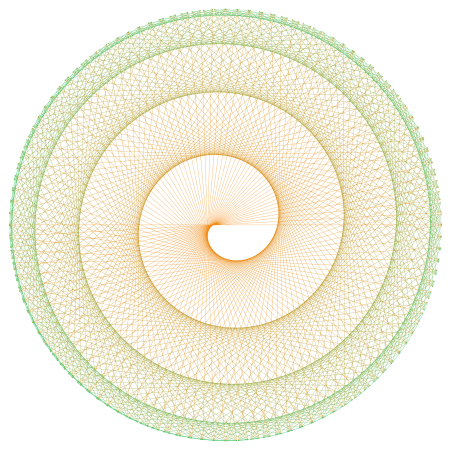
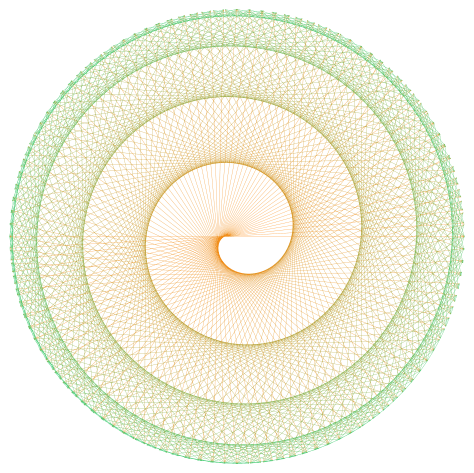
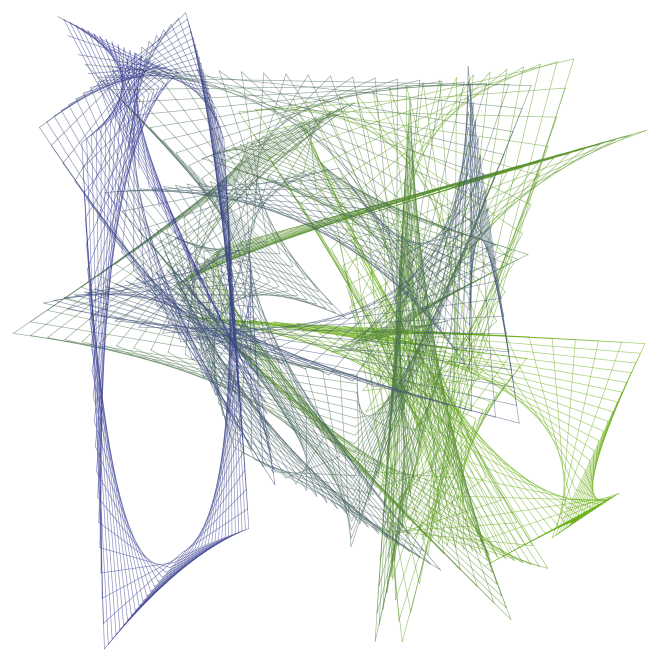
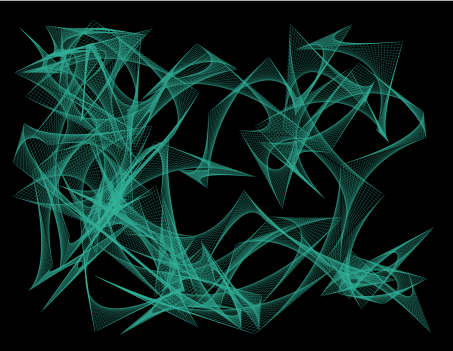
Creating Fractals VII: Iterated Function Systems III

Today, we’re going to wrap up our discussion of iterated function systems by looking at an algorithm which may be used to generate fractal images.

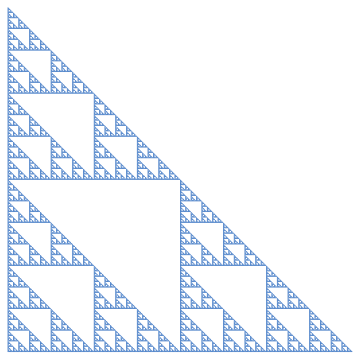
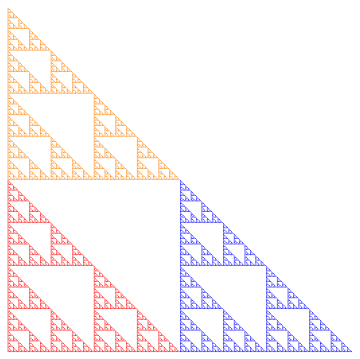
Recall (look back at the first post if you need to!) the Sierpinski triangle.  No matter what initial shape we started with, the iterations of the function system eventually looked like the Sierpinski triangle.
Sierp4

But there’s a computational issue at play.  Since there are three different transformations, each iteration produces three times the number of objects.  So if we carried out 10 iterations, we’d have 310 = 59,049 objects to keep track of. Not too difficult for a computer.

But let’s look at the Sierpinski carpet. With eight different transformations, we’d have 810 = 1,073,741,824 objects to keep track of. Keeping track of a billion objects just isn’t practical.

Of course you could use fewer iterations — but it turns out there’s a nice way out of this predicament. We can approximate the fractal using a random algorithm in the following way.

Begin with a single point (usually (0,0) is the easiest).  Then randomly choose a function in the system, and apply it to this point.  Then iterate:  keep randomly choosing a function from the system, then apply it to the last computed point.

What the theory says (again, read the Barnsley book for all the proofs!) is that these points keep getting closer and closer to the fractal image determined by the system.  Maybe the first few are a little off — but if we just get rid of the first 10 or 100, say, and plot the rest of the points, we can get a good approximation to the fractal image.

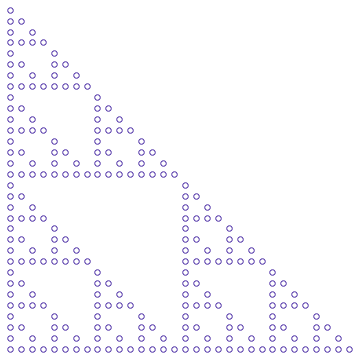
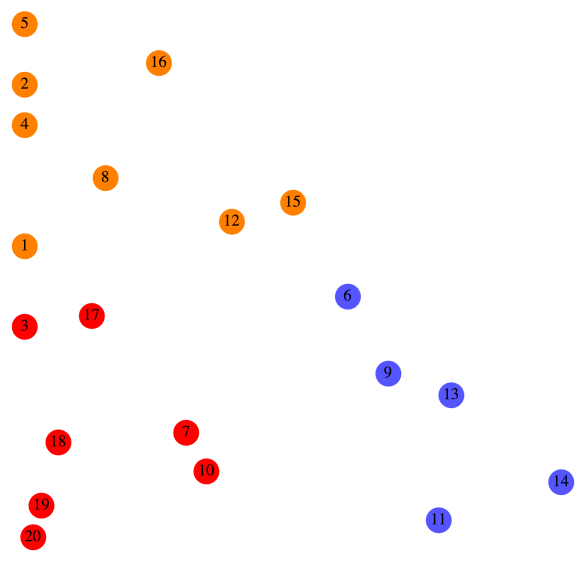
Consider the Sierpinski triangle again.  Below is what the first 20 points look like (after (0,0)), numbered in the order in which they’re produced.
Sierp20.png

Let’s look at this in a bit more detail.  For reference, we’ll copy the function system which produces the Sierpinski triangle from the first post.

F_1\left(\begin{matrix}x\\y\end{matrix}\right)=\left[\begin{matrix}0.5&0\\0&0.5\end{matrix}\right] \left(\begin{matrix}x\\y\end{matrix}\right)

F_2\left(\begin{matrix}x\\y\end{matrix}\right)=\left[\begin{matrix}0.5&0\\0&0.5\end{matrix}\right] \left(\begin{matrix}x\\y\end{matrix}\right)+\left(\begin{matrix}1\\0\end{matrix}\right)

F_3\left(\begin{matrix}x\\y\end{matrix}\right)=\left[\begin{matrix}0.5&0\\0&0.5\end{matrix}\right] \left(\begin{matrix}x\\y\end{matrix}\right)+\left(\begin{matrix}0\\1\end{matrix}\right)

Now here’s how the color scheme works.  Any time F_1 is randomly chosen, the point is colored red.  For example, you can see that after Point 6 was drawn, F_1 was chosen, so Point 7 was simply halfway between Point 6 and the origin.

Any time F_2 is chosen, the point is colored blue.  For example, after Point 8 was drawn, F_2 was randomly chosen.  You can see that if you move Point 8 halfway to the origin and then over right one unit, you land up exactly at Point 9.

Finally, any time F_3 is chosen, the point is colored orange.  So for example, it should be clear that moving Point 7 halfway toward the origin and then up one unit results in Point 8.

Of course plotting more points results in a more accurate representation of the fractal.  Below is an image produced using 5000 points.
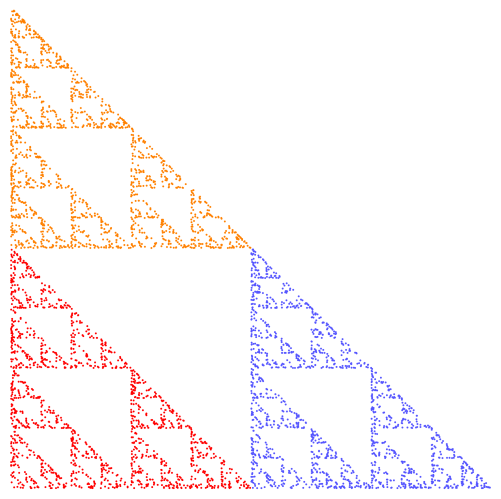
Sierp5000.png

To get more accuracy, simply increase the number of points, but decrease the size of the points (so they don’t overlap).  The following image is the result of increasing the number of points to 50,000, but using points of half the radius.
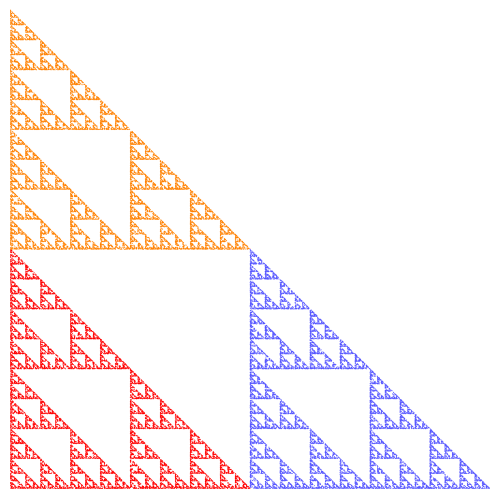
Sierp50000

There’s just one more consideration, and then we can move on to the Python code for the algorithm.  How do we randomly choose the next affine transformation?

Of course we use a random number generator to select a transformation.  In the case of the Sierpinski triangle, each of the three transformations had the same likelihood of being selected.

Now consider one of the fractals we looked at last week.
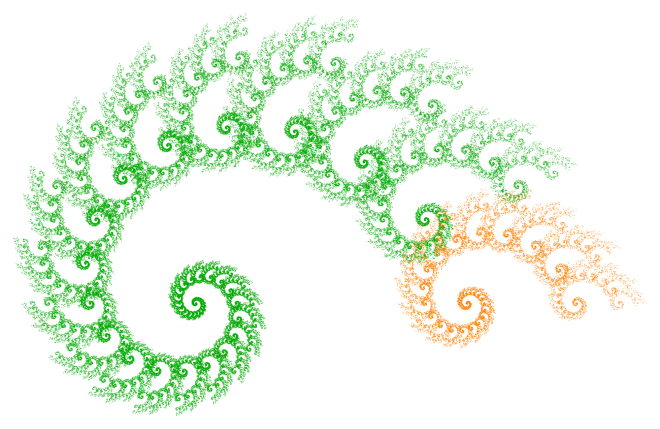
Two4

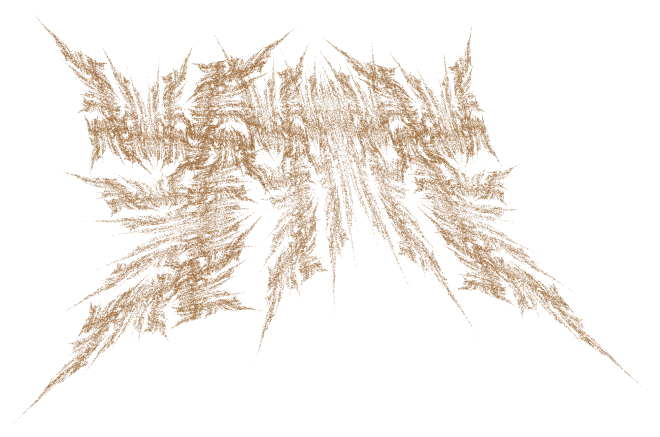
If the algorithm chose either transformation with equal probability, this is what our image would look like:
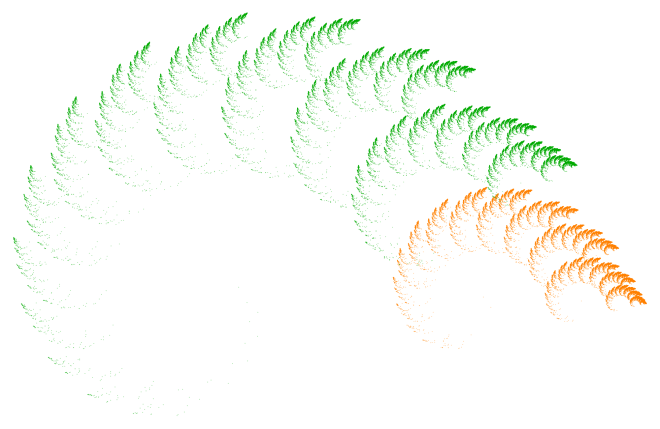
Two450.pngOf course there’s a huge difference!  What’s happening is that transformation F_{{\rm orange}} actually corresponds to a much smaller portion of the fractal than F_{{\rm green}} — and so to get a more realistic idea of what the fractal is really like, we need to choose it less often.  Otherwise, we overemphasize those parts of the fractal corresponding to the effect of F_{{\rm orange}}.

Again, according to the theory, it’s best to choose probabilities roughly in proportion to the portions of the fractal corresponding to the affine transformations.  So rather than a 50/50 split, I chose F_{{\rm green}} 87.5% of the time, and F_{{\rm orange}} just 12.5% of the time.  As you’ll see when you experiment, a few percentage points may really impact the appearance of a fractal image.

From a theoretical perspective, it actually doesn’t matter what the probabilities are — if you let the number of points you draw go to infinity, you’ll always get the same fractal image!  But of course we are limited to a finite number of points, and so the probabilities do in fact strongly influence the final appearance of the image.

So once you’ve chosen some transformations, that’s just the beginning.  You’ve got to decide on a color scheme, the number of points and their size, as well as the probabilities that each transformation is chosen.  All these choices impact the result.

Now it’s your turn!  Here is the Sage link to the python code which you can use to generate your own fractal images.  (Remember, you’ve got to copy it into one of your own Projects first.)  Freely experiment — I’ve also added examples of non-affine transformations, as well as affine transformations in three dimensions!

And please comment with interesting images you create.  I’m interested to see what you can come up with!

Creating Fractals VI: Iterated Function Systems II

What I find truly remarkable about iterated function systems is the astonishing variety of fractals you can create with just two affine transformations.  Today, we’ll explore some more examples so you can get a better feel for how the particular affine transformations used affect the final image.

Let’s begin with the example from last week, which I color coded for easy reference.

Two2.png

Below are the affine transformations which generated this fractal.

F_{{\rm green}}\left(\begin{matrix}x\\y\end{matrix}\right)=\left[\begin{matrix}0.95&0\\0&0.95\end{matrix}\right]\left[\begin{matrix}\cos(20^\circ)&-\sin(20^\circ)\\\sin(20^\circ)&\cos(20^\circ)\end{matrix}\right]\left(\begin{matrix}x\\y\end{matrix}\right)

F_{{\rm orange}}\left(\begin{matrix}x\\y\end{matrix}\right)=\left[\begin{matrix}0.4&0\\0&0.4\end{matrix}\right]\left(\begin{matrix}x\\y\end{matrix}\right)+\left(\begin{matrix}1\\0\end{matrix}\right)

Now compare the different colors in the image with the transformations.  The first transformation combines a scaling by 0.95 with a rotation by 20 degrees.  If you look closely, you’ll see that the green part of the image looks the same as a slightly smaller copy of the entire fractal, except rotated by 20 degrees from the center of the spiral (note that there is no translation involved in F_{{\rm green}}).

The orange part of the image is simply a scaled version of the entire fractal (by a factor of 0.4), but moved over 1 unit.  You can see this by looking at the form of the affine transformation F_{{\rm orange}}.

The pair of affine transformations used to generate the spiral exactly describes the self-similarity.  This is easy to see after the fact — but I really have no helpful suggestion as to how to predict the form of this wonderful spiral just by looking at the transformations.

Now let’s just slightly alter the second transformation so that in addition to scaling by a factor of 0.4, there is a shear as well.

F_{{\rm orange}}\left(\begin{matrix}x\\y\end{matrix}\right)=\left[\begin{matrix}0.4&0.4\\0&0.4\end{matrix}\right]\left(\begin{matrix}x\\y\end{matrix}\right)+\left(\begin{matrix}1\\0\end{matrix}\right)

Notice how the fractal changes.

Two3.png

The shear distorts each arm of the spiral — stretching it in the process and creating more interaction between the various arms.

Now let’s go back to the original spiral and change the first transformation instead, slightly altering the scale factor.

F_{{\rm green}}\left(\begin{matrix}x\\y\end{matrix}\right)=\left[\begin{matrix}0.9&0\\0&0.9\end{matrix}\right]\left[\begin{matrix}\cos(20^\circ)&-\sin(20^\circ)\\\sin(20^\circ)&\cos(20^\circ)\end{matrix}\right]\left(\begin{matrix}x\\y\end{matrix}\right)

Here is what happens:

Two4

I really don’t how to predict that this is what would happen — but I find it fascinating how even small changes in parameters can really change the way a fractal looks.

I can’t resist one more image created by changing the second transformation to

F_{{\rm orange}}\left(\begin{matrix}x\\y\end{matrix}\right)=\left[\begin{matrix}0.4&0\\0.4&0.15\end{matrix}\right]\left(\begin{matrix}x\\y\end{matrix}\right)+\left(\begin{matrix}1\\0\end{matrix}\right).

Here is the result.Two5.pngThere’s so much you can do with just one pair of transformations!

While it may not be possible to guess exactly what a fractal will look like, it’s possible to know some features of a fractal based upon how you set up your transformations.  For example, condsider this combination of a shear and a scaling:

G_1\left(\begin{matrix}x\\y\end{matrix}\right)=\dfrac23\left[\begin{matrix}1&-1/2\\0&1\end{matrix}\right]\left(\begin{matrix}x\\y\end{matrix}\right)+\left(\begin{matrix}1\\1\end{matrix}\right).

There will be some aspect of the fractal which can be described by a shear.  For the second transformation, just take the opposite of the first, as follows.

G_2\left(\begin{matrix}x\\y\end{matrix}\right)=-\dfrac23\left[\begin{matrix}1&-1/2\\0&1\end{matrix}\right]\left(\begin{matrix}x\\y\end{matrix}\right)-\left(\begin{matrix}1\\1\end{matrix}\right).

This must force the fractal to have 180 degree rotational symmetry!  Think about how the algorithm works — take the image under one transformation, then the other — but by their definitions, the images must be symmetric about the origin.

Two21.png

So it is possible to use our knowledge of affine transformations to design, even if to a limited extent, some features of the resulting fractal.

As another example, we can assemble a fractal similar to two smaller copies of itself, one piece of which is a 90 degree rotation of the other.  Use G_1 as above, and then use

G_2=\left[\begin{matrix}0&-1\\1&0\end{matrix}\right]G_1.

Here is the resulting fractal.

Two22.png

You can clearly see how the red piece is a 90 degree counterclockwise rotation of the purple piece.  This follows from how we created the second transformation from the first.

One reason for the diversity of fractals is the number of parameters needed to specify two affine parameterizations — twelve in all.  Now some sets of parameters may create the same fractal — but even so, the wealth of variations is still staggering.

But will just any affine transformations work?  There are some constraints — for example, you can’t describe a fractal in terms of larger copies of itself.  So the affine transformations cannot make a starting object bigger, or else each successive iteration will expand.  Of course you can still use such affine transformations to create interesting graphical effects — but the resulting image will not be an approximation to a fractal.

Next week, we’ll look at the algorithm which I used to create all these fractal images, and I’ll give you some Python code you can use yourself.  But before I close, I’d like to share a few favorite fractals which are generated by just two affine transformations.

First, the Beetle.  It looks like it’s scampering toward you.

Beetle2.png

And the second, well, it’s just yellow.

Yellow.png

Until next week!

Creating Fractals V: Iterated Function Systems I

So just what are fractals?

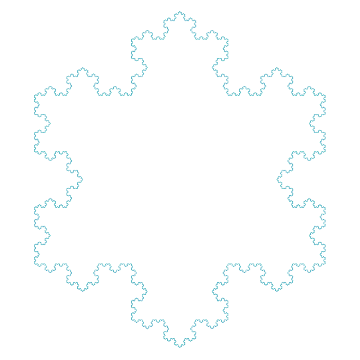
In this blog, we’ve looked at a few examples of fractals so far — the Koch snowflake, for example — and informally called images created by the same algorithm “fractal images.”   But what makes the Koch snowflake a fractal?

Regardless of which definition you find on the internet, you’ll find ideas about self-similarity which keeps being repeated at ever smaller scales.  Truly rigorous definitions require some truly advanced mathematics…but we’ll illustrate the idea with another classic fractal, the Sierpinski triangle.

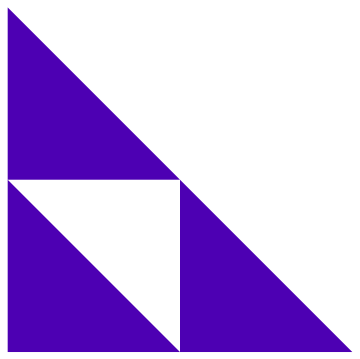
Begin with any triangle, and then remove the triangle formed by connecting the midpoints of the sides, as shown below.

Sierp1

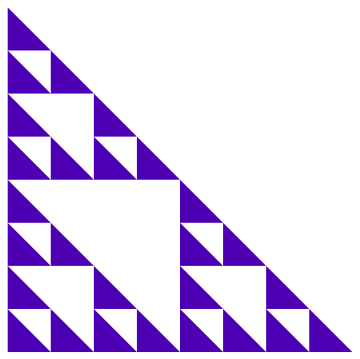
Now repeat — in each triangle, remove the triangle formed by connecting the midpoints of the sides.  Two more iterations results in the following image.

Sierp2.png

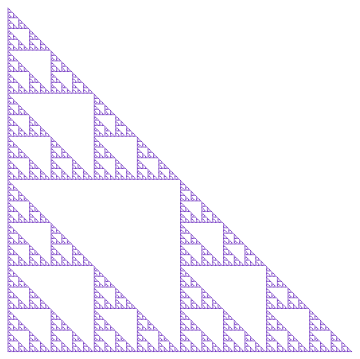
And five more iterations gives the Sierpinski triangle.

Sierp3

Of course, in a mathematical sense, this process goes on infinitely — you still keep getting triangles on each iteration, so you’re never done.  But as far as creating computer graphics is concerned, you can just stop when the iterations start looking the same.

The self-similarity of the Sierpinski triangle should now be fairly evident.  The way it’s constructed, you’ll notice that each of the three smaller triangles shown in the first iteration looks identical to the entire Sierpinski triangle, except that it’s shrunk by a factor of two along all dimensions.  This is self-similarity:  one can say that the Sierpinski triangle is, in a mathematical sense, built up of smaller copies of itself.

Now how can we describe this self-similarity?  Using affine transformations.  (If the notations and functions below aren’t familiar to you, study up on linear and affine transformations, and how you use matrices to represent them.)

First, we’ll color code parts of the Sierpinski triangle for easy reference.

Sierp4.png

Next, we’ll introduce a coordinate system.  Let the origin be the vertex of the right angle of the triangle, with the usual x– and y-axes.  If you apply the transformation

F_1\left(\begin{matrix}x\\y\end{matrix}\right)=\left[\begin{matrix}0.5&0\\0&0.5\end{matrix}\right] \left(\begin{matrix}x\\y\end{matrix}\right)

to the entire Sierpinski triangle, you get the red “shrunk by half” triangle at the right angle of the Sierpinski triangle.

Now if you apply the transformation

F_2\left(\begin{matrix}x\\y\end{matrix}\right)=\left[\begin{matrix}0.5&0\\0&0.5\end{matrix}\right] \left(\begin{matrix}x\\y\end{matrix}\right)+\left(\begin{matrix}1\\0\end{matrix}\right)

to the Sierpinski triangle, you’ll get the blue portion — shrunk by a factor of two, and moved over one unit.  Finally, if you apply the transformation

F_3\left(\begin{matrix}x\\y\end{matrix}\right)=\left[\begin{matrix}0.5&0\\0&0.5\end{matrix}\right] \left(\begin{matrix}x\\y\end{matrix}\right)+\left(\begin{matrix}0\\1\end{matrix}\right),

you’ll get the orange part, shrunk by a factor of two and moved up one unit.  (Note that the choice of moving one unit is arbitrary — you’ll get something that looks like the Sierpinski triangle as long as you move the same amount in each direction.)

What all this means is that the functions F_1, F_2, and F_3 mathematically describe the self-similarity of the Sierpinski triangle, and so they may be used to generate the Sierpinski triangle.  You can see where the term iterated function system comes from by thinking about using these functions iteratively to generate a fractal image.

Now here’s the amazing part.  If you look at the very first iteration we did, you’ll see three triangles, each representing one of these transformations.  So imagine beginning with a different object — say a unit square — and perform these three transformations; that is, shrink by half, shrink and move to the right, and shrink and move up.  You’ll get something like this:

Sierp21

After two more iterations, here is what you’ll see.

Sierp22

Notice the self-similarity.  If we keep going another six iterations, we get…

Sierp23

…the Sierpinski triangle again!

If you start out with a small circle, you get the following after five iterations.

Sierp31

What this means is that the Sierpinski triangle — in a very real, rigorously mathematical sense — is completely determined by the transformations which describe its self-similarity.  Yes, the final result is always a triangle, independent of what shape you start out with!  Filled squares, circles, whatever object you choose — the result will always be the Sierpinski triangle.

If you really want to know why, read Michael Barnsley’s Fractals Everywhere.  But be forewarned — you need to know a lot of mathematics to completely understand what’s going on.  But it really is amazing.

In order to create your own fractals, you don’t need to know all the mathematical details.  You just need to understand the nature of self-similarity, and how to represent it using affine transformations.

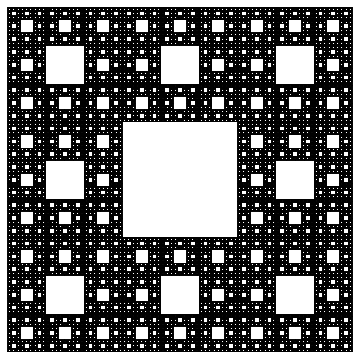
Another famous fractal is the Sierpinski carpet.

Carpet

You can see the self-similarity here as well.  Note that there are eight smaller, identical copies of the Sierpinski carpet which make up the fractal.  So you would need eight affine transformations, one of which would be

G\left(\begin{matrix}x\\y\end{matrix}\right)=\left[\begin{matrix}1/3&0\\0&1/3\end{matrix}\right] \left(\begin{matrix}x\\y\end{matrix}\right)+\left(\begin{matrix}1\\0\end{matrix}\right).

Notice that the scaling is only by a factor of 1/3 here, and that the choice of units to move is arbitrary (as with the Sierpinski triangle).  Further, it doesn’t matter what object you begin with — you’ll always end up with the Sierpinski carpet when your done.

Where do we go from here?  Next week, we’ll look at how different choices of affine transformations affect the fractal image.  For example, suppose we return to the Sierpinski triangle example, but replace F_1 with the transformation

F_1\left(\begin{matrix}x\\y\end{matrix}\right)=\left[\begin{matrix}0.25&0\\0&0.5\end{matrix}\right] \left(\begin{matrix}x\\y\end{matrix}\right).

How should this affect the fractal?  Look at the result, and see if you can figure it out.

NewSierp

Can you see the two identical copies, each shrunk by half, generated by F_2 and F_3?  But note that the copy at the right angle is actually shrunk by one-fourth along the x direction — but this is expected as a result of the scaling by 0.25 along the x direction in F_1.

In other words, when we change the description of the self-similarity (that is, when we change the affine transformations), we change what the fractal looks like — because, in a mathematical sense, the fractal is the set of affine transformations.  But here’s the difficult question — can you predict what the fractal will look like only by looking at the affine transformations?

Well, if you can, then you’re a lot better at this than I am!  It’s not an easy task — but it is what makes creating fractals fun.  Usually, you don’t know what the result will be.  That’s the adventure!  You often surprise yourself by what you discover.

In the next few posts, we’ll consider different types of affine transformations (like rotations, shears, etc.), and then discuss an algorithm which can generate approximations to fractals.  Stay tuned!

Two.png

P.S.  This fractal was created using only two affine transformations.  Next week we’ll see how.

New Koch Snowflakes

I was working with Thomas a few weeks ago in his quest to learn how to create fractal images.  He essentially asked the following question:  How can you locally change the appearance of a fractal?

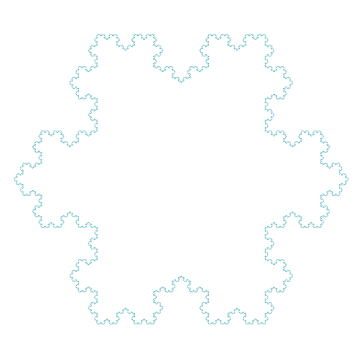
For example, consider the well known Koch snowflake (which we discussed earlier on Day007), shown below.

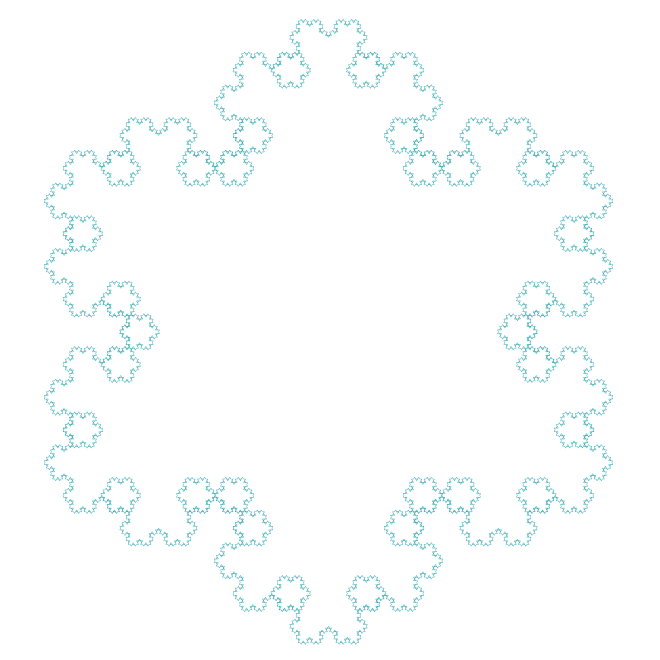
Day033Koch1bThomas asked if it might be possible to keep the overall shape of the snowflake, but change the details at the edges.  To discuss this possibility, let’s recall the algorithm for producing the snowflake (although this algorithm produces only one-third of the snowflake, so that three copies must be put together for the final image):
sf1(n):

  • if n = 0, then draw a line segment,  otherwise:
  • sf1(n-1); turn -60; sf1(n-1); turn 120; sf1(n-1); turn -60; sf1(n-1)

This is “pseudocode” for drawing part of the snowflake n levels deep.  The difficulty is that the segments are drawn only when n = 0.  Thomas was wanting something different to happen, say, at level 3 and below in an algorithm which recursed 6 levels deep.

Then it occurred to me — there’s no reason the “otherwise” couldn’t be broken down into further cases:  make the recursive call depend on the value n.

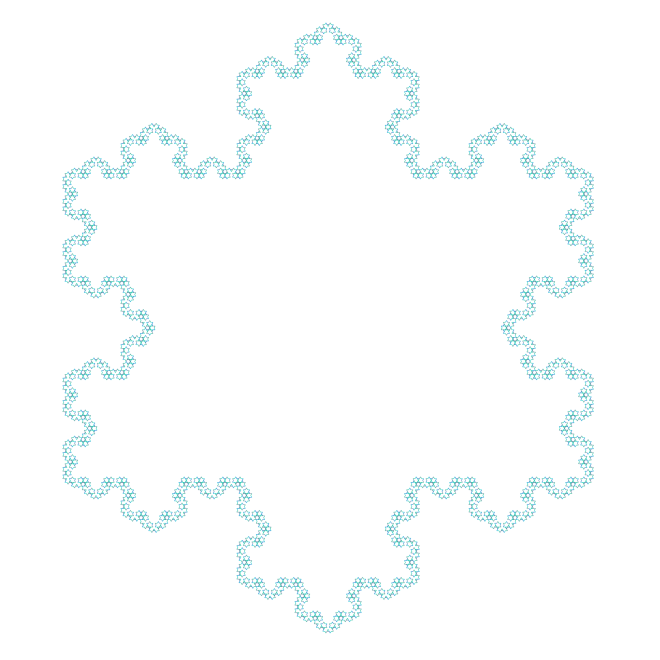
But in order to do this, I needed to use a different recursive call.  What to use?  Well, it happens that by slightly changing the angles in sf1, the snowflake undergoes a rotation by 30 degrees.  Here is the pseudocode, along with the image.

sf2(n):

  • if n = 0, then draw a line segment,  otherwise:
  • sf2(n-1); turn 120; sf2(n-1); turn -60; sf2(n-1); turn 120; sf2(n-1)

Day033Koch2

So how do we combine these fractals?  As suggested earlier, break down the original “otherwise” clause.  The following algorithm adds a “little” of the second snowflake to the first since the second algorithm is only called when n = 1.

new1(n):

  • if n = 0, then draw a line segment, otherwise:
  • if n = 1, sf2(n-1); turn 120; sf2(n-1); turn -60; sf2(n-1); turn 120; sf2(n-1)
  • else sf1(n-1); turn -60; sf1(n-1); turn 120; sf1(n-1); turn -60; sf1(n-1)

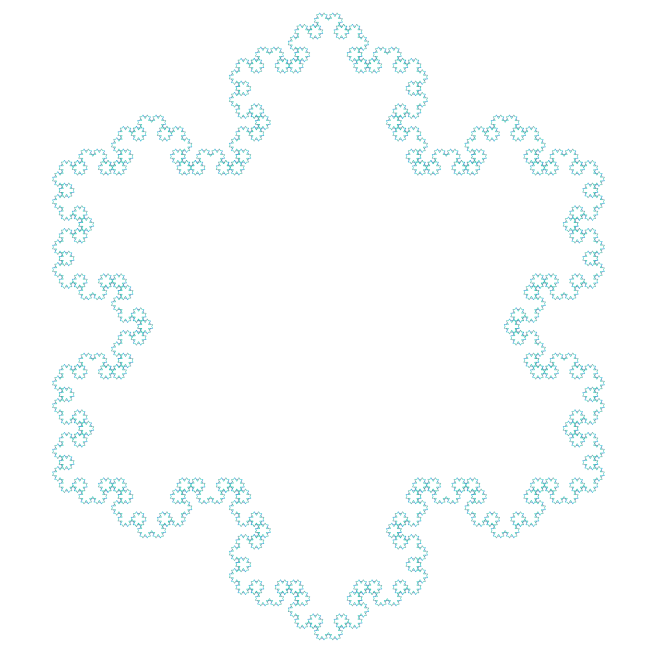
Here is the resulting fractal image (recursing 6 levels):

Day033Koch3

You can already see a difference.  Now let’s try adding a little “more” of the second snowflake by using the second algorithm when n is 1 or 2, as shown below.

new2(n):

  • if n = 0, then draw a line segment, otherwise:
  • if n <= 2, sf2(n-1); turn 120; sf2(n-1); turn -60; sf2(n-1); turn 120; sf2(n-1)
  • else sf1(n-1); turn -60; sf1(n-1); turn 120; sf1(n-1); turn -60; sf1(n-1)

Day033Koch4

Going one level further — using the second algorithm when n is 1, 2, or 3 — produces the following curve.Day033Koch5

One level further yields:

Day033Koch6

And we’re done, since the next level will in fact give the rotated snowflake sf2(6) (although pieced together a little differently — but the resulting fractal is the same).

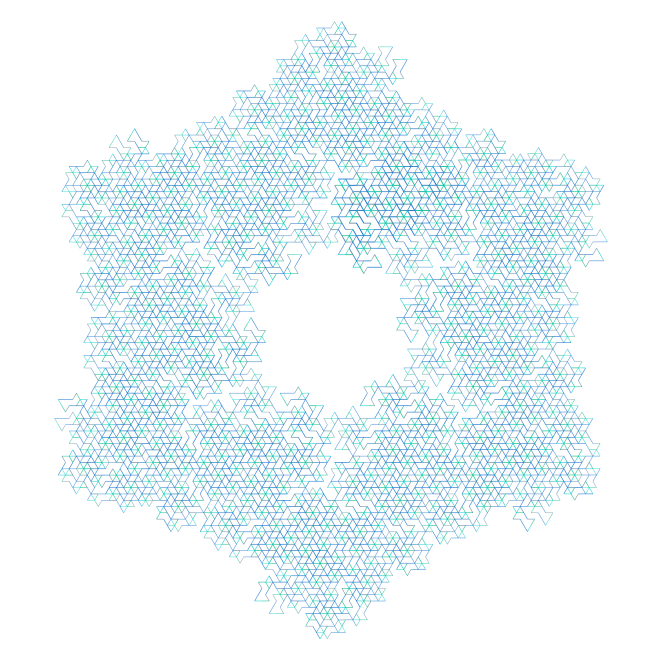
Now I’ll leave it up to you.  There’s really so much to explore here.  Here’s just one example.  Adding just one additional call to sf2(n-1) after the last one in the algorithm produces the following image:Day033Koch7Amazing, isn’t it?  Such a small change results in a very different feel to the final image.  And of course once smaller changes are made, there’s no reason to stop.  Maybe branch into more than two fractal routines?  Or maybe perform sf1 when n is odd, and sf2 when n is even.  Or….
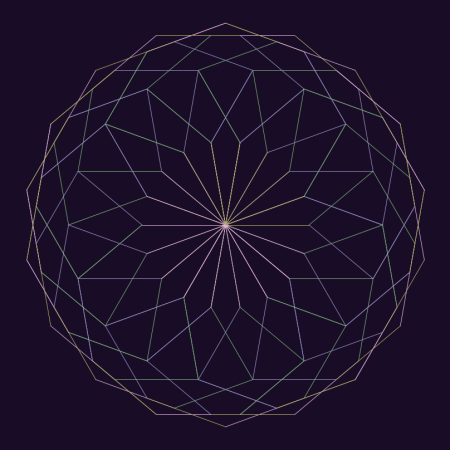
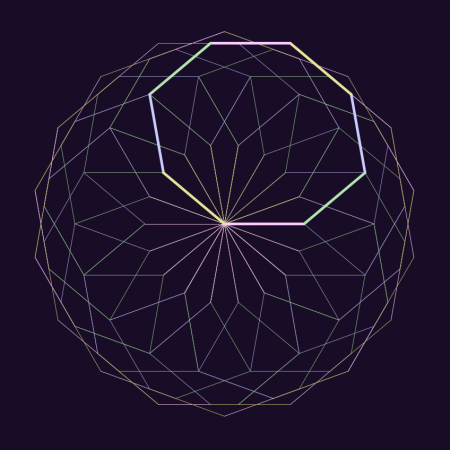
The only limitation, it seems, is one’s imagination.  Comment if you create something interesing!

Creating Fractals IV: Results!

It has been a while since I wrote about making fractal images — and you might recall that  I made several observations about how the images were drawn, but didn’t actually prove that these observations were valid in any general sense.

That has changed!  A few weeks ago, I decided that it was time to bite the bullet.  I had a concise way to describe what angles were chosen (see Creating Fractals, Day008, and Creating Fractals II:  Recursion vs. Iteration, Day009), I accumulated a lot of empirical evidence that validated this description, and now it was time to prove it.  I made a goal of solving the problem by the end of this semester.

It is amazing what a little determination can do!  I went back to the code I wrote last October, stared at and studied countless sequences of angles and their corresponding images, and within a few days had a working hypothesis.  Less than a week had gone by before I had a fairly complete proof.  What I thought would take me an entire semester took me about a week.

In today’s post, I’ll talk about specific cases which directly relate to my previous blog posts.  I won’t really prove anything here, but instead present the idea of the proof.  When I write up the complete proof, I’ll post a link to the paper.

The main insight came from looking at sums of angles (mod 360).  Let’s look at a specific example, using angles of 40 degrees and 60 degrees (both counterclockwise).  These angles produce the following image:

Day027fractal_40_60_1

The angle sequence follows the pattern described in Creating Fractals II:  40, 60, 40, 40, 40, 60, etc., where the “40” occurs in position k if the highest power of 2 which divides k is even, and “60” occurs if this power is odd.

The arms in this figure have eight segments each; one such arm is highlighted below.

Day027fractal_40_60_2

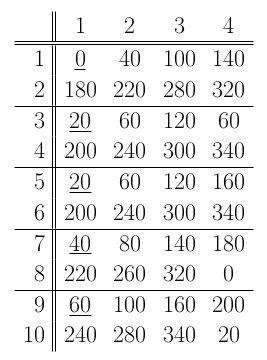
Now let’s write the angle sums, starting with 0 since the first segment starts at the center and moved directly to the right.  We get

Day027Table

The numbers at the top and left are for row/column reference only.  We begin with 0, and 40, then add 60 to get 100, then add 40 more to get 140, etc.  Once we hit 320 and need to add 60, we write 20 instead of 380 (since as far as angles go, 20 and 380 are equivalent).  This is essentially saying that we are adding angles mod 360 (that is, using modular arithmetic).

These angle sums are the actual directions the lines are being drawn in the plane.  You should be able to see the first two rows of this table clearly in the previous image — as you go around the first arm, your direction changes and points in the direction indicated by the appropriate sum in the table.

But notice the following interesting fact:  each sum in Row 2 is exactly 180 degrees more than the corresponding sum in Row 1!  What this means is as follows:  once the first four segments are drawn, the next four are drawn pointing in the opposite directions.  In other words, they geometrically “cancel out.”  This means that after the first two rows, you’ll return to the origin (as seen above).

You can continue to follow along in the table and view the next arm being drawn, as shown below.

Day027fractal_40_60_3

This might seem “obvious” by looking at the table — but it is only obvious after you know how to draw the table.  Then it’s easy!  Even the mathematics is not all that difficult.   I can’t emphasize enough, though, how using the computer to look at several (and more!) examples was a tremendous help in making progress towards how to arrange the table.

Now look at the “20” underlined at the beginning of Row 5.  Because of the recursive pattern of the angles, this means that the next eight segments drawn will exactly repeat the second arm.

Just when do the arms repeat?  The underlined angles (which indicate the direction the next eight segments are starting off) are the beginning of the sequence

0, 20, 20, 40, 60, 80, 80, 100, 100, 120, ….

If we look at the successive differences, we obtain the sequence

20, 0, 20, 20, 20, 0, 20, 0, 20, ….

But notice that this is the same pattern as the sequence of angles:

40, 60, 40, 40, 40, 60, 40, 60, 40, …

This means that the same pattern which indicates which angle to choose also determines which arms are redrawn.  Really amazing!

The separation of 20 degrees between arms is just 60 – 40.  In general, if d is the difference between the two angles, you need to take the greatest common divisor of d and 360, which is often abbreviated gcd(d, 360).  But in this case, since 20 is already a factor of 360, you get the difference back.

Once you know the arms are separated by 20 degrees, you know that there are 360/20 = 18 arms in the final image.

As I mentioned, it is possible to prove all this — and more.  Although we looked at a specific case, it is possible to make generalizations.  For example, there were 8 segments in each arm — and 8 is a power of 2 (namely 3).  But other powers of two are possible for the number segments in arms — 4, 32, 64, etc.

In addition, there is nothing special about degrees.  Why divide a circle into 360 equal parts?  You can divide the circle into a different number of parts, and still obtain analogous results.

The number of interesting images you can create, then, is truly astonishing.  But the question still remains:  have we found them all?  In addition to all the images obtained by looking at arms whose segments number a power of two, it is possible to obtain more regular figures.

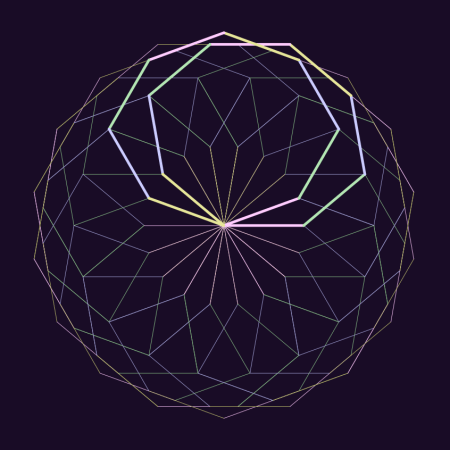
Day027fractal_40_60_4

Such images are obtained when both angles are the same.  But other than this, I haven’t found any other types of figures.

So are there any others?  Maybe.  Maybe not.  That’s part of the fun of doing mathematics — you just never know until you try.  But I think this question will be a bit harder to answer.  Is some enthusiastic reader tempted to find out?  Perhaps all it takes is a little determination….

Envelopes III: Art and Randomness

This week, I’ll discuss some of the artistic decisions made in producing the images in last week’s post, as well as explore randomly-generated envelopes.

First, let’s look at the following piece.

Day020env7

Initially, I created the image below, which is essentially a recreation of a hand-drawn sketch made in 1983.

Day022env1

Although the lines are clean and precise, the overall impression lacks a hand-drawn feel. I thought to create more texture by having the alternating envelopes go around the origin more than once, as seen here.

Day022env4

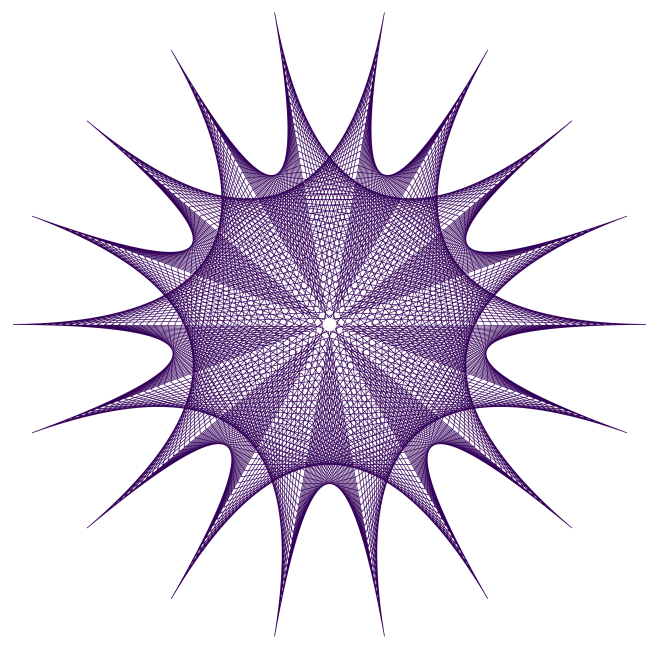
I liked this better, but I thought to adjust the angular sizes of the envelopes so that the tips were evenly spaced around a circle. I also adjusted the number of lines in each envelope, producing the final result.

The point of this discussion is to illustrate the process of creating digital art – it’s not as simple as just writing a few lines of code and executing them. There is an iterative give-and-take to the process, which is half the fun of it, anyway.

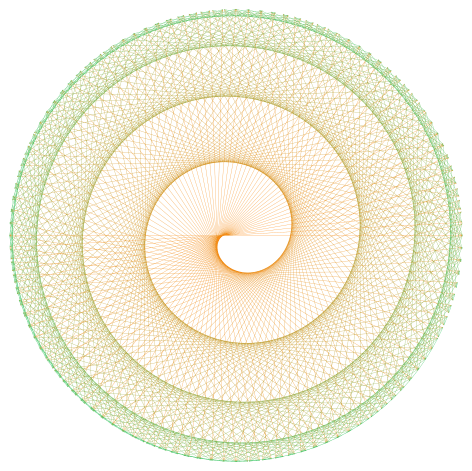
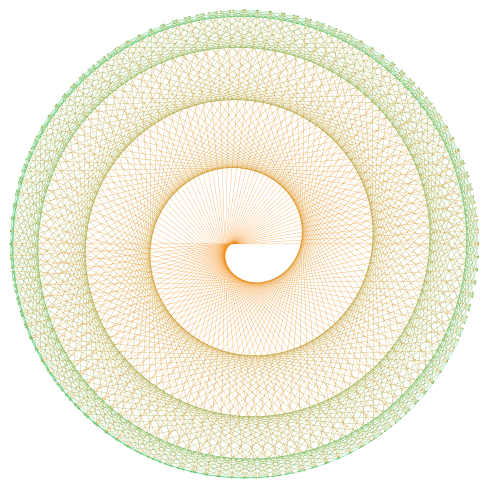
The next image I’d like to look at is the spiral, shown below.

Day020spiral3

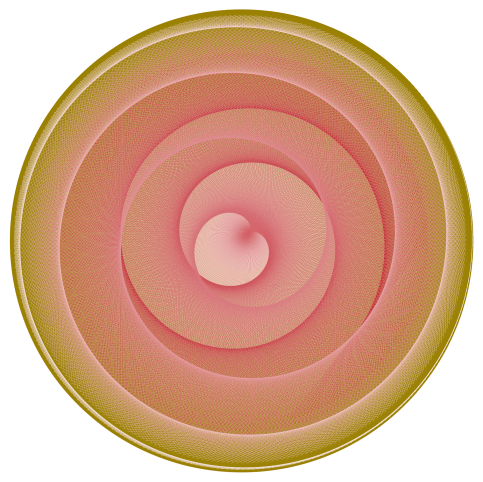
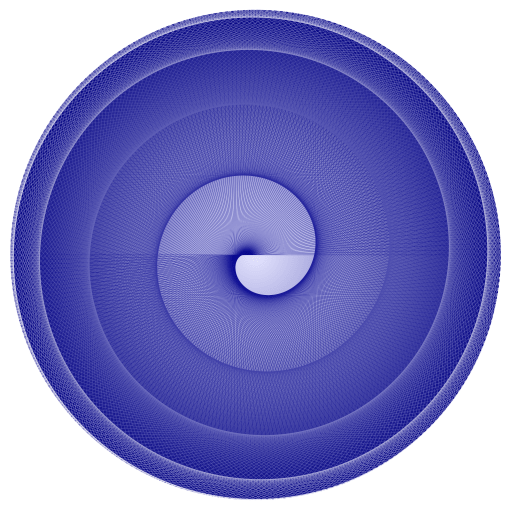
This is a recreation of an image originally drawn in red, and I thought to create texture by introducing a color gradient. However, using a linear color gradient from the first line to the last produced the following result.

Day022spiral3old

This looked a little off to me – moving toward the green a bit too fast. Now if you remember the discussion of color gradients when we looked at the Evaporation piece (see Day012), you’ll recall that we could create nonlinear gradients which created different visual effects. I found that changing the gradient from linear (a power of 1) to a power of 0.8 produced something I liked more. Of course the difference is not drastic, but I want to illustrate the fact fine-tuning parameters can introduce subtle effects in the final image.

Now on to a discussion of randomly-generated envelopes. Today will only be an introduction – there’s lots more to explore, including envelopes in three dimensions.  But I’ve only begun working on this idea a few weeks ago, and so hope to illustrate how previous work with randomness may be incorporated into the design of envelopes.

Of course just what is random is a more subtle question here. Below is an image where the successive endpoints used to create the envelope are randomly chosen from a unit square, and a color gradient is produced from the beginning to the end to give a sense of motion.

Day022RandEnv2

You’ll immediately notice that some envelopes span the entire width or height of the image. As it happens, this makes finding nicely-balanced images difficult. I looked at a few hundred images before I found the one above – most lacked balance.

I also wanted to try bright colors against black – this produces nice results for an online blog (though not so wonderful for a printed image). Again, I didn’t like the results obtained by allowing the points determining the envelopes to be completely random. So I introduced a constraint that the endpoint of the next segment had to be “close” to the previous one – in the image below, the endpoints could be no further than one unit in either the x- or y-direction from the previous point. So there are more local effects, and none of the broader lines slicing the image in half.

Day022RandEnv1-12-26-15x

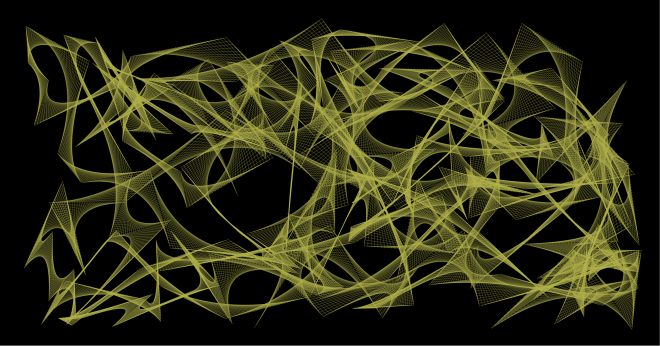
The image looked a little too square, and I thought the contrast too much for so many envelopes.  So I looked at a few hundred more images on a wider field, this time in yellow. I found one with some interesting interactions, shown below.

Day022RandEnv2-12-26-15

Now I felt I was getting somewhere. But I thought the image looked a bit too flat – I wanted to add some texture or dimensionality to the image.

The first thing I tried was slightly varying the yellows used to draw the lines. This helped to add a measure of interest to the envelope. But the background needed some work.

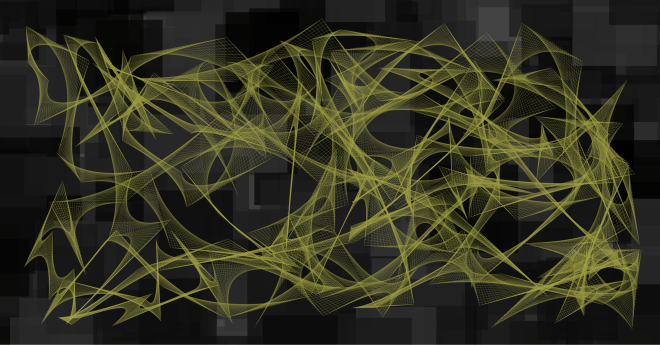
I wanted the background to contrast the flowing curves of the envelopes, and so I thought some overlapping squares of varying dark shades of gray might do the trick. Here is the result.

Day022RandEnv4-12-27-15

The background took a few hundred iterations as well. Now I didn’t want the squares too small, and I didn’t want too many – the sizes of the squares should compare to the sizes of the individual envelopes, and there should be roughly as many. But the problem was that randomly-generated sets of squares would often leave too many gaps in the background – and simply overlaying a background of a single shade of gray wasn’t particularly pleasing.

So I had to play with the parameters generating the overlapping squares, as well as try a few hundred iterations until I found something with a nice balance. In addition, I wanted the background to be “interesting” in the largish hole just left of center – some iterations just produced a solid gray there, which didn’t work for me.

It took a bit of time – as well as feedback from my friend Sandy (thanks, Sandy!) to whom I showed successive drafts of this image – but I finally found a combination of colors/backgrounds which I felt held together. Of course you might think otherwise – and you are welcome to give it a try and create your own image with randomly-generated envelopes….

I hope this helps to illustrate the creative process – one of the main themes of this blog. While a final image may look complex with various different aspects interacting with each other, it’s not always the case that each aspect was conceived of at the same time. This is the great thing about computer-generated art – it’s so easy to explore a multitude of ideas without leaving the comfort of your keyboard.

But this is also perhaps the greatest challenge – because you can do so much, finding the right balance between simplicity and complexity in part distinguishes computer-generated images from computer-generated art.

Finally, I cannot resist including an image I tweeted a few days ago @cre8math — a variation on the spiral theme.  I find it unusually compelling.

Day022spiral01-08-16

Envelopes II: Making Spirals

While I don’t intend to make a habit of midweek posts (though thanks for the idea, Dane!), last week’s entry was so popular that I thought I’d write a short post on how the spiral designs are created.  Here’s one of last week’s images to refresh your memory.

Day020spiral3

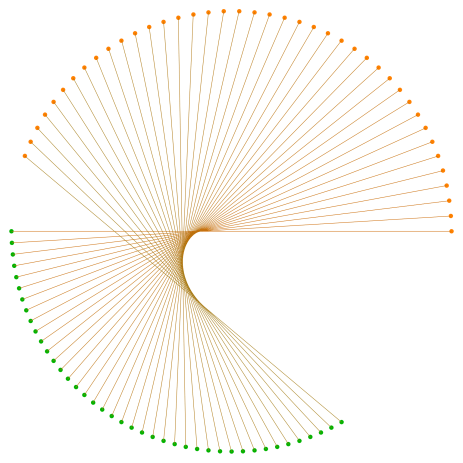
These are not difficult to create,  but because of all the overlap of lines, it’s not immediately obvious how they are generated.  The image below shows the first forty line segments drawn, and highlights the endpoints of these segments.

Day021spiralmethod

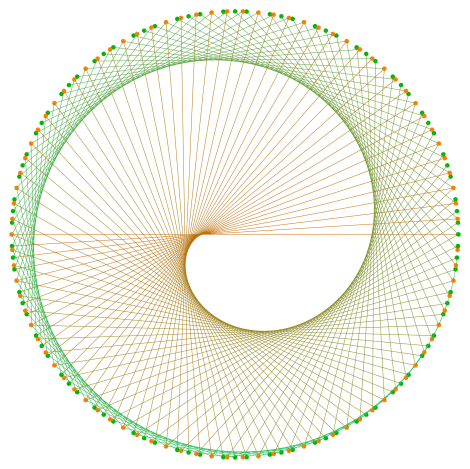
The first line drawn is horizontal, and the endpoints are 180 degrees apart.   More lines are generated by having the orange endpoint (starting at the right) move 4 degrees counterclockwise, while the green endpoints (starting at the left) move just 3 degrees.  As a result, the endpoints of the second segment are just 179 degrees apart on the circle.  The orange endpoints start gaining on the green endpoints, closing the gap by 1 degree with each successive segment.

So the final spiral includes exactly 180 segments, which may be expressed in a form which may be easily generalized (and which is used in the Python code).  Note that the “180” on the left side of the equation represents the number of segments drawn, and the “180” on the right indicates the angular distance that the endpoints of the initial segment are separated on the circle.

180 = \dfrac{180}{4-3}.

All 180 segments are shown below, where the endpoints are retained to illustrate the process (although note that many endpoints are written over as the algorithm progresses).

Day021spiralmethod2

The Python code is fairly short (here is the Sage link — look at some of the earlier posts about using Sage if you haven’t used it before). The only mathematics you need to understand is the standard conversion from polar to rectangular coordinates — it’s much easier to describe the endpoints first in polar coordinates since the radius of the circle is fixed and only the angles the endpoints make with the center of the circle change.

Finally, I include an image created with contrasting colors on the background as well.  Create your own version, and post as a comment!

Day021spiral3

Envelopes I

Most of us have probably created a mathematical envelope, although we likely didn’t call it that.  Below is an example which may easily be sketched on a piece of graph paper.  You can see the “move one up/down, move one left/right” method of determining the ends of the line segments.  I created this envelope of lines using Python — we’ll look at the code later so you can make some of your own.
Day020Envelope1

I first began sketching envelopes when I was an undergraduate.  Of course they were aesthetically quite interesting — but as a mathematician, you cannot help but ask exactly what curve you’re approximating by drawing an envelope of lines.

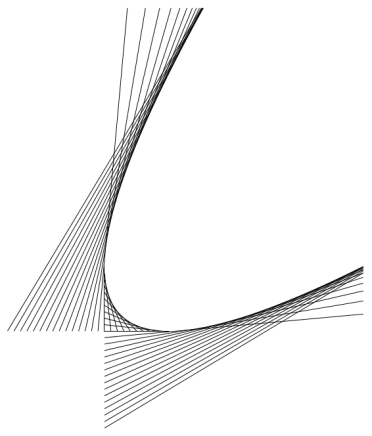
Although it seems that you might be drawing tangents to a circular arc, this is not the case.  By continuing the pattern of moving one up/down and left/right, the envelope in the first quadrant develops into the following figure.

Day020Envelope2

You can fairly easily see a parabola forming — and this parabola is in fact the curve whose tangents we drew on our graph paper.

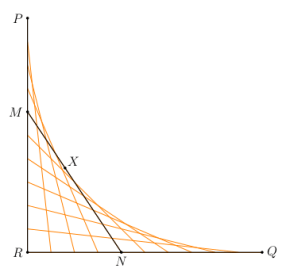
How can we prove this?  We need a theorem about tangents to parabolas, which we state as it applies to the case at hand, as shown below.Day020Envelope3

Here is how the theorem goes.  Suppose P and Q are points on a parabola whose tangents intersect at R.  If X is a point on the parabola between P and Q, and if the tangent at X intersects PR at M and QR at N, then

[PM] / [MR] = [MX] / [XN] = [RN] / [NQ],

where we use “[AB]” to mean the length of the segment AB.  But in our case, [PR] = [QR], so this means that

[PM] = [RN]  and  [MR] = [NQ],

which validates our “one down, one right” method of creating endpoints of tangent segments.  This is because by moving down one and right one, we are preserving the relationship [PM] = [RN], and hence also [MR] = [NQ].

For the curious reader, this helpful theorem about tangents to parabolas is very nicely proved by Steven Taschuk in his Notes on tangents to parabolas on p. 5 (where the names of points in my diagram above correspond to the names of points in his proof of the theorem).

So they’re parabolas!  Not what you’d expect at first glance.

Of course back when I was beginning college, there was no easy way to create desktop graphics, and so I used the tried and true pen-and-paper method.  I took a photo of one of my favorites from that time period.

Day020byhand

Drawing these figure takes patience and concentration.  I distinctly recall the first draft of this piece.  If you look at the left square, you’ll notice that the blue lines look like they’re underneath the red lines.  This isn’t hard to do — just draw the red lines first, and then when drawing the blue lines, just stop at the red and continue after.  But I lost focus for just a second, and drew a blue line right over the red lines — and then had to start over.  There was no erasing.

For those of you who want to try creating images by hand, a word about technique.  When using an ink pen, the ink tends to blot — and if you drag the pen along a ruler, you might get end up with a smear of ink.  So keep a napkin or paper towel handy, and wipe the tip of your pen on the paper towel after drawing each line.  It’ll save you a lot of grief.

Despite the relatively simple method of drawing envelopes of lines, there is ample room for creativity.  Here is a computer-generated version of a drawing dated December 24, 1986.  It’s another of my favorites, and I love the effect of bright color against black.

Day020Twist

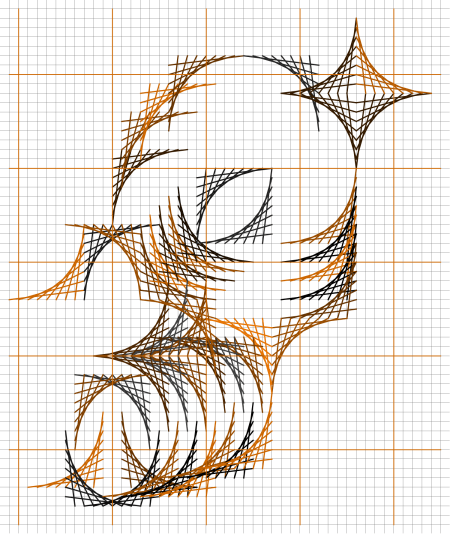
There’s no reason to stop at purely geometrical designs, either.  Here is an abstract half-face of a tiger, created with a simulated graph paper background.

Day020Tiger

And then there’s polar graph paper!  When you wanted a graph, well, you just drew it — there was no graphing calculator/computer to do it for you.  So you had graph paper handy.  Below is a design I created just for this post, based on some older sketches.

Day020env7

Here’s another image based on a sketch made on polar graph paper.

Day020spiral3

It’s been really interesting to experiment with the computer, since designs which might have taken hours to draw can be rendered in a few seconds (after you’ve done the programming, of course).

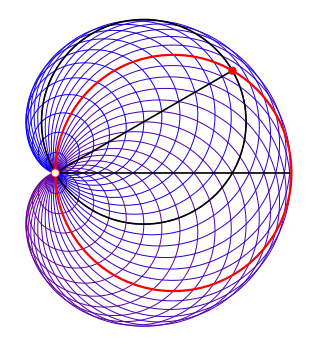
Envelopes are not restricted to being created by lines, however.  The figure below creates a cardioid from tangent circles.

Day020Envelope4

A base circle (in red) is given, and a point on the circle is selected (the white point at the left).  Now for every other point on the circle (like the red point), create a circle by using that point and the white point as ends of a diameter of the circle (drawn in black).  These circles are internally tangent to a cardioid.

I don’t have room for the proof of this construction here, but there is a very nice book called Envelopes by Boltyanskii (just google it) which illustrates many additional examples of envelopes as well as techniques to determine what the resulting curve is.  Some of the techniques do involve calculus, so be forewarned!  This book was my real introduction to a study of mathematical envelopes.

Now it’s time for you to create your own envelopes!  You can click on the Sage link to follow along and alter the code as you see fit.

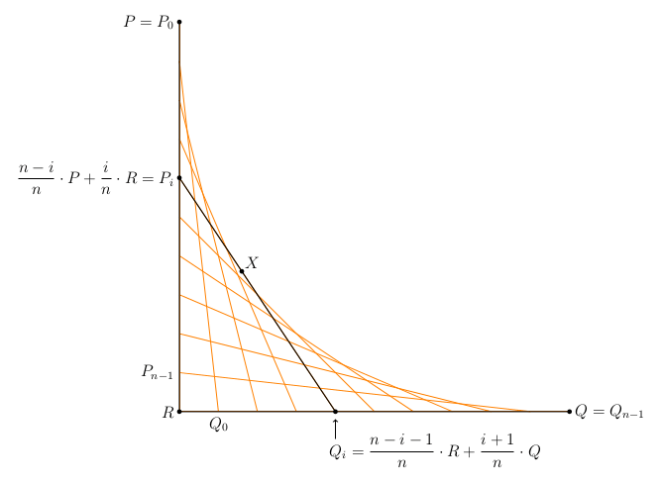
The routines aren’t really too complex.  Note the use of vectors in Python to make working with the mathematics fairly simple.  This is so we can compute the endpoints of the segments of the envelope easily.  The mathematics involved is illustrated in the following figure.

Day020Envelope5

It looks more complicated than it is.  Since P_i is between P and R, we may write P_i as a weighted average of P and R.  We must do so in such a way that i=0 gives the point P=P_0, and P_{n-1} is just above R.

Similarly, Q_i is a weighted average of R and Q, and must be such that Q_0 is just to the right of R, and Q_{n-1}=Q.  Take a moment to study the figure and see that it all works out.  Note that the variables in the code mimic those in the figure exactly, so at least there is visual proof that the labels are correct!
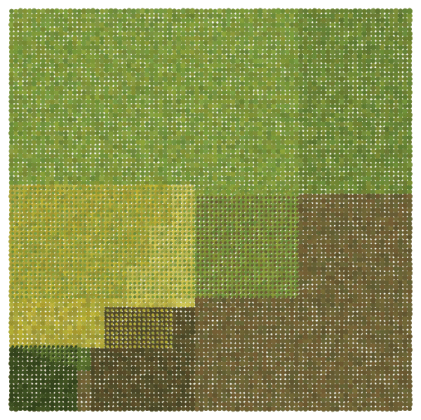


So I’ll leave you to go ahead and experiment.  Feel free to comment with images you create using the Python code.  And stay tuned for next week, when I’ll talk about creating random envelopes.  There’s some really interesting stuff going on there….

Geometrical Dissections II: Four to One

This week, I’d like to discuss a piece of artwork which began as a geometrical dissection — I call it Four to One.

Day015FourToOneWeb

I thought it would be interesting to discuss the process of creating such a piece from beginning to end.  The creative process is not really mystical, but because we so often only see the finished product, it may seem that way at times.

It all began about 15 years ago, when I was teaching the Honors Geometry course I mentioned in last week’s post.  In Greg’s book Dissections Plane & Fancy, he takes a few chapters to discuss dissections from squares to other squares — frequently two different squares to one, or three to one.  But there was very little about four-to-one dissections, so I thought I’d explore this avenue a bit more.

I can’t recall precisely how I arrived at the identity

15^2+36^2+48^2+64^2=89^2.

I might have written some for loops — but computers were not as fast back then….  Likely I used something like Lebesgue’s formula on p. 80 of Greg’s book, which gives a formula for creating three-to-one square dissections.  Then if one of those squares could be written as a sum of two others, I’d have a four-to-one dissection.  In particular, once I (might have!) found out that

39^2+48^2+64^2=89^2,

I could use the fact that 15^2+36^2=39^2 (which is just a multiple of the Pythagorean triple (5, 12, 13)) to obtain the possibility of a four-to-one dissection described above.

Now this only suggested the puzzle, not the actual dissection itself.  And there certainly is a dissection — at the very least, we can cut up all the squares into 1\times1 unit squares and reassemble!

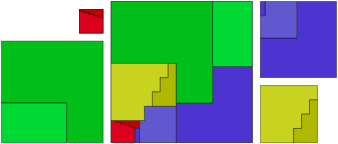
This is hardly an elegant solution; but I did come up with the following one:

Day015FourToOneGeometryWeb

I liked it because each square was cut into just two or three pieces, which was particularly nice.  Moreover, only one piece needed to be rotated.  But even though the number of pieces is relatively small, there is still the possibility that a dissection may exist using fewer pieces.

Of course my original solution was sketched on a yellowing piece of graph paper — but what to do with it now?

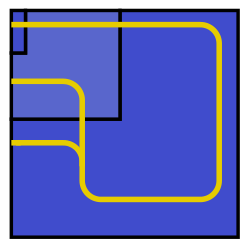
My first attempt looked like this:

FourSquaresToOne

I was thinking of creating various pathways through the dissected squares so that when they were rearranged, the pathways would still line up.  I abandoned this approach, however.  I can’t remember exactly why, but the results didn’t appeal to me — and besides, the paths themselves actually had nothing to do with the dissection puzzle itself.

But then I had the thought — which was in fact a real challenge — can I communicate what’s happening with the dissection using only one square?  In other words, could I depict the geometrical dissection by just showing the largest square without giving the viewer the four smaller squares?  I think what might have moved me in this direction is that there was just no elegant way of putting all five squares together in a composition.  There were just too many corners.

So I though of overlapping the smaller squares onto the largest square, as shown below (note:  you’ll notice an error in the geometry, but as it was a draft I discarded, I didn’t bother to fix it):

Day015FourSquaresToOne2

Day015FourToOneGeometryWeb

Now if you look very carefully, you can find all the pieces of the dissected squares in the largest square.  There is some overlap, of course — but smaller circles were overlaid on larger ones so colors from both circles could be seen.  (I copied the original dissection again so it’s easier to compare.  I used different colors as the images were created at different times, so watch out! )

I liked the idea — I felt I was getting somewhere.  But I wasn’t happy with the colors.  Now creating mathematical art makes you hungry — I can clearly recall driving to lunch while I was in the middle of this project, and I can even remember the road.  It was Fall in Princeton, NJ, and the leaves had already turned color.  No more oranges and reds — but lots of greens and yellows, as well as browns from the tree trunks.  My color palette!

What intrigued me about the idea was the fact that I was working with a very abstract, almost purely mathematical problem — and here I was, thinking about using organic colors from nature, from my life experience.

Now I had already been working with the ideas from Evaporation, and realized if I was using an organic palette, I couldn’t have the circles be regular, precise — and the colors couldn’t be pure either, just like you might find hundreds of shades of yellow in a Fall forest.

Day015FourToOneExcerptWeb

So, as shown in this close-up of Four to One, the colors were varied by using random numbers just as was done for Evaporation, but there were no extremes — each piece of each square had to be clearly recognizable if the dissection was to be clearly seen.

The sizes of the circles varied as well, helping to contribute to a natural texture.  Here, you can clearly see how smaller circles were overlaid on larger circles for the two-color effect.  The smaller circles, however, had only about one-fourth the area of the larger ones, so it was clear which color was dominant.

And there it is!  The creative process is not magical, not mystical — in fact, much of the time it seems to consist of failed inspiration….  Consider yourself lucky if your first attempt turns out to be your last as well — but more often than not, creativity is an iterative process involving constant revision.

So my advice is to stick to it!  Don’t worry if the first attempt isn’t what you imagine.  Now I used Mathematica to create this image — and I’ve been programming in Mathematica for over twenty years.  So I’m pretty good at taking an idea and implementing it fairly quickly.  But if you’re relatively new to programming, you’ve got to be patient with your programming skills as well.  I can tell you though — it’s worth it.  Don’t let anyone else tell you any different….

Geometrical Dissections I

Closely related to the problem of tiling the plane with polygons is that of dissecting one geometrical object into pieces that can be rearranged to form another. The classic example is the following dissection of an equilateral triangle to a square, attributed to Henry Dudeney, 1907.

Day014TriToSquare

Note that the pieces are exactly the same in both polygons. It’s not hard to appreciate the beauty and elegance of this “geometrical artwork.” And it’s not hard to imagine a puzzle based on this dissection — give the puzzler these four pieces with instructions to make both a triangle and a square from the same pieces.

This led me, once upon a time, to construct an Honors Geometry course centered around geometrical dissections using  Greg Frederickson’s wonderful Dissections Plane & Fancy.

But even “simple” dissections — involving triangles and squares — weren’t so easy to create. For example, the pieces divide the base of the equilateral triangle into lengthsDay014formulaand these are some of the easier calculations! I won’t say more about that here — but you can read all about this dissection and many others in Greg’s book.
So I was fascinated by geometrical dissections — but I needed a way to make the idea accessible to my students. I thought — what could you create just by experimenting with dissections on ordinary graph paper?

Well, I have been answering this question for over 15 years now. I’ll start with some introductory ideas in this post, but this is definitely not the last word on dissections!

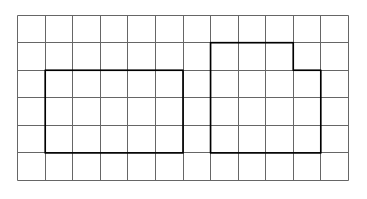
Let’s begin with the following puzzle.  By cutting the rectangle along the grid lines, how many pieces are needed so you can also make the square with a corner missing?Day014Puzzle1AThis seems like an easy puzzle to solve, as shown below.Day014Puzzle1BSo yes, only two pieces are necessary — but one had to be rotated. Here is the question: can this puzzle be solved with just two pieces, but with neither piece rotated?
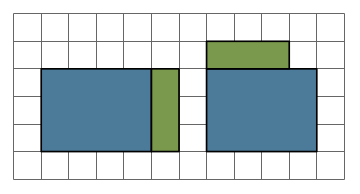
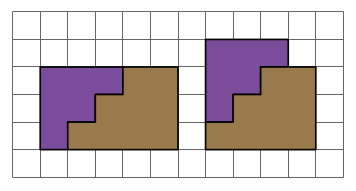
It turns out this is possible — but a solution requires a bit more creativity. Here is one way to do it:Day014Puzzle1CThis is a solution technique commonly used in Dissections Plane & Fancy.  Why bother?  In the world of geometric dissections (and it is a growing universe, surely, as any internet search will show), finding a minimum number of pieces is the primary objective.  But of all solutions with this minimum number of pieces, “nicer” solutions require rotating the fewest number of pieces.  And rotating none at all is — in an aesthetic sense — “best.”  It is also preferable not to turn pieces over, although sometimes this cannot be avoided for minimal solutions.

Another criterion for solutions might be whether they can be hinged or not, as Greg discusses extensively in Hinged Dissections:  Swinging & Twisting.  We won’t have time to explore this topic today.

Of course there is no reason you have to start with a rectangle, and also no reason why you need to restrict yourself to just one shape.  The puzzle below shows how you can find a four-piece, rotation-invariant dissection from two smaller octagons to one larger octagon.Day014Puzzle2It is important to note that the octagons here are not regular.  A quick glance through Dissections Plane & Fancy will reveal that dissections involving regular polygons are generally rather difficult (as the initial triangle-to-square example amply shows).
Further, “two-to-one” dissections lend themselves nicely to a square grid, as the diagonal of a unit square has length square root of 2.  Take a moment to study the octagon dissection again — paying particular attention to the side lengths — to see how this plays out.  In the world of regular polygons, however, two-to-one dissections are in general quite difficult.  Visit Gavin Theobald’s web page of two-to-one dissections to see some fascinating examples.

It is not hard to create dissection puzzles of your own — a pencil, eraser (!!!), and graph paper are all you need.  What is difficult, however, is proving that you’ve found the fewest number of pieces.  And when you have, proving that your dissection is unique.  Uniqueness is virtually impossible to prove, but sometimes you can get a handle on minimality.  For example, if the octagon dissection could be done in three pieces, one of the smaller octagons would have to be uncut.  It’s not hard to see that there is no way of cutting the other smaller octagon into just two pieces to create the larger octagon.

What I enjoy about creating dissection puzzles is that there is not a single strategy you can use to solve them.  You really need to use your imagination.  Sometimes you might even surprise yourself by stumbling upon a really neat puzzle, like the one below.

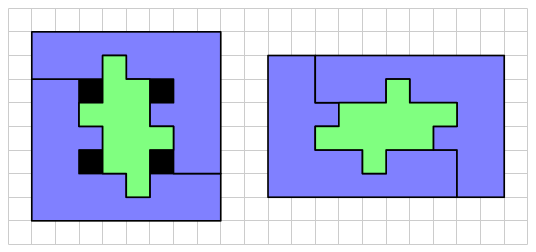
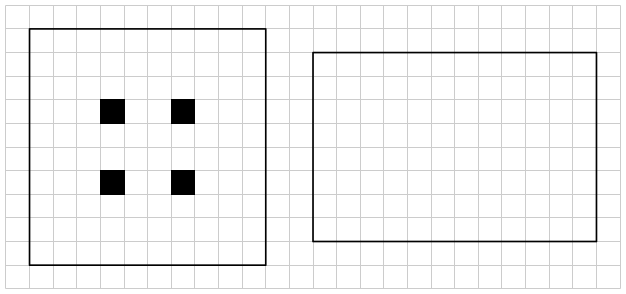
Here, an 8 x 8 square with four holes (shown in black) can be dissected into three pieces to create a 6 x 10 rectangle, although one piece needs to be rotated.  There is a simple elegance about this dissection which I find appealing.Day014Puzzle3

Another grid which lends itself to creating dissections is a grid of equilateral triangles.  We won’t go into details here, but you can get the idea with the following dissection of an irregular dodecagon to an equilateral triangle in just five pieces.  (The minimal dissection with regular polygons requires eight pieces.)Day014Puzzle4I’ll leave you with two puzzles to think about.  Of course, you can just make up your own.  If you come with anything interesting, feel free to comment!
For this puzzle, my best solution is four pieces, without needing to rotate any pieces or turn any pieces over.  (Black squares are holes.)Day014Puzzle5

For the last puzzle, my best solution is five pieces — but I had to turn over and rotate two of the pieces.Day014Puzzle6

A parting suggestion:  when looking up dissections on the web, be sure to use the search words “geometrical dissections…..”