Beguiling Games I: Nic-Nac-No

It has been some time since I’ve posted any puzzles or games.  In going through some boxes of folders in my office, I came across some fun puzzles I created for a class whose focus was proofs and written solutions to problems.  I’d like to share one this week.

For the assignments, I sometimes wrote stories around the puzzles.  So here is one such story.  The date on the assignment, if you’re interested in such things, is January 16, 2003.  (I assume that you are familiar with the game Tic-Tac-Toe, as well as the fact that if both players play intelligently, the game ends in a draw.)  I called the game “Nic-Nac-No.”

Betty and Clyde, after their favorite breakfast of blueberry pancakes one sunny Saturday morning, began a Tic-Tac-Toe tournament.  They were reasonably bright children — taking turns going first, the initial 73 games ended in a draw.

“Just once, Clyde, couldn’t you try putting your O first on a side instead of in a corner?” prodded Betty.  “That way, it wouldn’t be the same boring game every time.”

“Well, it’s my turn to go first this time,” said Clyde, putting an X in the center.  “OK, now you show me how you want me to play so I can do it that way next time.”

“Oh, shut up, Clyde,” sighed Betty, putting her O in the upper left corner.  And so game #74 ended in a draw.

“Hey, I’ve got an idea!” exclaimed Clyde.  “Let’s make up different rules.  How about this:  the first one who gets three-in-a-row loses.  Whaddya think, Betty?”

“That’s so random, Clyde,” said Betty, secretly excited by the suggestion.

“No, it’s not.  And besides,” reasoned Clyde, “it’s got to be better than playing another game of Tic-Tac-Toe since you won’t ever try anything different.

“OK, potato brain.  Let’s try.  You go first.”

“Great!” exclaimed Clyde, until he realized Betty was trying to outmaneuver him.  He just realized that it you’re trying to avoid three-in-a-row, the fewer squares you own, the better.

Assuming Betty and Clyde play optimally, will the game be a win for Betty, a win for Clyde, or a draw?

I should remark that the idea of a misere game — where you turn the winning condition into a losing condition — is not original with me.  But most students have not considered this type of game, so misere versions of games often make for engaging problems.

Before I discuss the solution, you might want to try it out for yourself!  There are likely many strategies possible to produce the desired result; I’ll just show you the ones I thought were the most straightforward.

In my solution, Betty and Clyde use different strategies, but the end result is the same:  the game must end in a draw.  Let’s look at what strategies they might use.

It turns out that if Clyde starts in the center, he can use a strategy where he does not lose.  It’s fairly simple:  always play opposite Betty.  Thus, when Betty plays a corner/side, Clyde takes the opposite corner/side.

Why can’t Clyde lose?  First, it should be clear that Clyde can never make a three-in-a-row that passes through the center.  Since he always plays opposite Betty, any line of three passing through the center must contain two X’s and one O (recall Clyde started with an X in the center), and so is not a three-in-a-row.

What about a three-in-a-row along a side?  Since Clyde plays opposite Betty, if he ever placed an X to make three-in-a-row along a side, that would mean Betty already had three O’s in a row on the opposite side, and would have already lost!  So it’s impossible for Clyde to lose this way.

Since any three-in-a-row must pass through the center or be along a side, this means that Clyde — if he plays intelligently — can never lose Nic-Nac-No.

Now let’s look a non-losing strategy for Betty.  There is no guarantee she will be able to take the center square on her first move, so we’ve got to consider something different.  And we can’t just rely on playing opposite Clyde, since there is no opposite move if the takes the center first.  Moreover, it may be the case that Clyde uses some other strategy than the one I mentioned, so we can’t even assume that he does take the center on his first move!

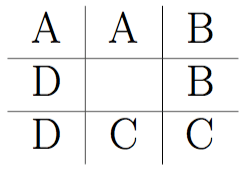
To see a strategy for Betty, consider the following diagram:
Day109NicNanNo

Betty’s strategy is simple:  place an O in one of the squares marked A, one marked B, one marked C, and one marked D.

Note that this is always possible.  Even if Clyde does not play in the center on his first move, he can only occupy one square labelled A, B, C, or D.  Then Betty places her O on the other square with the same letter.  If Clyde does begin in the center, then Betty has her choice of first move.

Since it is always possible — and since Betty only has four moves — these comprise all of Betty’s moves.  But note that since Betty never has an O on two of the same letter, she can never get three-in-a-row on a side.  Further, since Betty’s strategy never involves a move in the center, she can never get three-in-a-row in a line going through the center square.  This means that Betty can never lose!

So if the two players play their best games, then Nic-Nac-No ends up in a draw.  And while these strategies do indeed work, I would welcome someone to find simpler strategies.

I’ll leave you with another version of Tic-Tac-Toe to think about.  Here are the rules:  if during the game either play gets three-in-a-row, then X wins.  If at the end, no one has three in a row, then O wins.  Does X have a winning strategy?  Does O?  Note that in this game, there cannot be a draw!  I’ll give you the answer in my next installment of Beguiling Games….

To Processing I

I made a decision last week to abandon using Sage (now called CoCalc) as a platform in my Mathematics and Digital Art class.  It was not an easy decision to make, as there are some nice features (which I’ll get to in a moment).  But now any effective use of Sage comes with a cost — the free version uses servers, and you are given this pleasant message:  “This project runs on a free server (which may be unavailable during peak hours)….”

This means that to guarantee access to CoCalc, you need a subscription.  It would not be prohibitively expensive for my class — but as I am committed to being open source, I am reluctant to continue putting sample code on my web page which requires a cost in order to use.  Yes, there is the free version — as long as the server is available….

When I asked my students last semester about moving exclusively to Processing, they responded with comments to the effect that using Sage was a gentle introduction to coding, and that I should stick with it.  I fully intended to do this, and got started preparing for the first few days of classes.  I opened my Sage worksheet, and waited for it to load.  And waited….

That’s when I began thinking — I did have experiences last year where the class virtually came to a halt because Sage was too slow.  It’s a problem I no longer wanted to have.

So now I’m going to Processing right from the beginning.  But why was I reluctant in the past?

The issue is that of user space versus screen space.  (See Making Movies with Processing I for a discussion of these concepts.)  With Sage, students could work in user space — the usual Cartesian coordinate system.  And the programming was particularly easy, since to create geometrical objects, all you needed to do was specify the vertices of a polygon.

I felt this issue was important.  Recall the success I felt students achieved by being able to alter the geometry of the rectangles in the assignment about Josef Albers and color.  (See the post on Josef Albers and Interaction of Color for a refresher on the Albers assignment.)

peyton
Peyton’s piece on Josef Albers.

Most students experimented significantly with the geometry, so I wanted to make that feature readily accessible.  It was easy in Sage, the essential code looking something like this:

Screen Shot 2017-08-26 at 11.08.35 AM

What is happening here is that the base piece is essentially an array of rectangles within unit squares, with lower-left corners of the squares at coordinates (i, j).  So it was easy for students to alter the polygons rendered by using graph paper to sketch some other polygon, approximate its coordinates, and then enter these coordinates into the nested loops.

Then Sage rendered whatever image you created on the screen, automatically sizing the image for you.

But here is the problem:  Processing doesn’t render images this way.  When you specify a polygon, the coordinates must be in screen space, whose units are pixels.  The pedagogical issue is this:  jumping into screen space right at the beginning of the semester, when we’re just learning about colors and hex codes, is just too big a leap.  I want the first assignment to focus on getting used to coding and thinking about color, not changing coordinate systems.

Moreover, creating polygons in Processing involves methods — object-oriented programming.  Another leap for students brand new to coding.

The solution?  I had to create a function in Processing which essentially mimicked the “polygon” function used in Sage.  In addition, I wanted to make the editing process easy for my students, since they needed to input more information this time.

Day108pyde1

In Processing — in addition to the number or rows and columns — students must specify the screen size and the length of the sides of the squares, both in pixels.  The margins — xoffset and yoffset — are automatically calculated.

Here is the structure of the revised nested for loops:

Day108pyde2

Of course there are many more function calls in the loops — stroke weights, additional fill colors and polygons, etc.  But it looks very similar to the loop formerly written in Sage — even a bit simpler, since I moved the translations to arguments (instead of needing to include them in each vertex coordinate) and moved all the output routines to the “myshape” function.

Again, the reason for this is that creating arbitrary shapes involves object-oriented concepts.  See this Processing documentation page for more details.

Here is what the myshape function looks like:

Day108pyde3

The structure is not complicated.  Start by invoking “createShape,” and then use the “beginShape” method.  Adding vertices to a shape involves using the “vertex” method, once for each vertex.  This seems a bit cumbersome to me; I am new to using shapes in Processing, so I’m hoping to learn more.  I had been able to get by with just creating points, lines, rectangles, and circles so far — but that doesn’t give students as much room to be creative as including arbitrary shapes does.

I should point out that shapes can have subshapes (children) and other various attributes.  There is also a “fill” method for shapes, but I have students use the fill function call in the for loop to avoid having too many arguments to myshape.  I also think it helps in understanding the logical structure of Processing — the order in which functions calls are invoked matters.  So you first set your fill color, then when you specify the vertices of your polygon, the most recently defined fill color is used.  That subtlety would get lost if I absorbed the fill into the myshape function.

As in previous semesters, I’ll let you know how it goes!  Like last semester, I’ll give updates approximately monthly, since the content was specified in detail in the first semester of the course (see Section L. of 100 Posts! for a complete listing of posts about the Mathematics and Digital Art course).

Throughout the semester, I’ll be continuously moving code from Sage to Processing.  It might not always warrant a post, but if I come across something interesting, I’ll certainly let you know!

On Coding XI: Computer Graphics III, POV-Ray

It has been a while since the last installment of On Coding.  I realized there is still more to say about computer graphics; I mentioned the graphics package POV-Ray briefly in On Coding IX, but feel it deserves much more than just a mere mention.

I’d say I began using POV-Ray in the late 1990’s, though I can’t be more precise.  This is one of the first images I recall creating, and the comments in the file reveal its creation date to be 19 September 1997.

petrie

Not very sophisticated, but I was just trying to get POV-Ray to work, as I (very vaguely) remember.  Since then, I’ve created some more polished images, like the polyhedron shown below.  I’ll talk more about polyhedra in a moment….

XT-18-19-28

First, a very brief introduction.  POV-Ray stands for Persistence of Vision Raytracer.  Ray tracing is a technique used in computer graphics to create amazingly realistic images.  Essentially, the color of each pixel in the image is determined by sending an imaginary light ray from a viewing source (the camera in the image below) and seeing where it ends up in the scene.

800px-Ray_trace_diagram.svg
Image by Henrik, Wikipedia Commons.

It is possible to create various effects by using different light sources, having objects reflect light, etc.  You are welcome to read the Wikipedia page on ray tracing for more details on how ray tracing actually works; my emphasis here will be on the code (of course!) I wrote to create various three-dimensional images.  And while the images you can produce using a ray tracing program are quite stunning at times, there is a trade-off: it takes longer to generate images because the color of each pixel in the image must be individually calculated.  But I do think the results are worth the wait!

My interest in POV-Ray stemmed from wanting to render polyhedra.  The images I found online indicated that you could create images substantially more sophisticated than those created with Mathematica.  And better yet, POV-Ray was (and still is!) open source.  That means all I needed to do was download the program, and start coding….

R_3-5_Dual

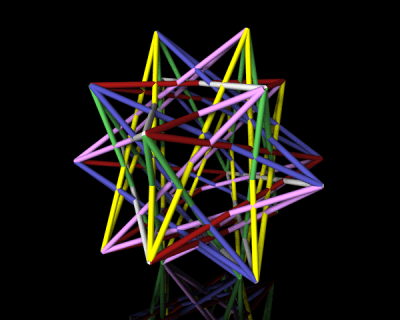
POV-Ray is a procedural programming language all in itself.  So to give you an idea of what a typical program looks like, I’ll show you the code which makes the following polyhedron:

tRp_52-3-5

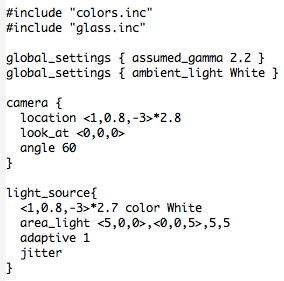
Here’s how it begins.

POV4

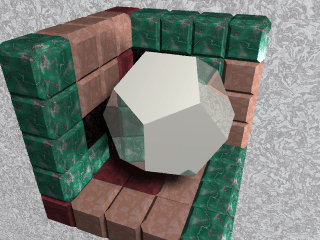
The #include directive indicates that the given file is to be imported.  POV-Ray has many predefined colors and literally hundreds of different textures:  glass, wood, stone, gold and other metals, etc.  You just include those files you actually need.  To give you an idea, here is the logo I created for Dodecahedron Day using  silver and stone textures.

logo3

Next are the global settings.  There are actually many global settings which do a lot more than I actually understand…but I just used the two which were included in the file I modeled my code after.  Of course you can play with all the different settings (there is extensive online documentation) and see what effects they have on your final image, but I didn’t feel the need to.  I was getting results I liked, so I didn’t go any further down this path.

Then you set the camera.  This is fairly self-explanatory — position the camera in space, point it, and set the viewing angle.  A fair bit of tweaking is necessary here.  Because of way the image is rendered, you can’t zoom in, rotate, or otherwise interact with the created image.  So there is a bit of trial-and-error in these settings.

Lighting comes next.  You can use point light sources in any color, or have grids of light sources.  The online documentation suggested the area lighting here (a 5-by-5 grid of lights spanning 5 units on the x-axis and 5 units on the z-axis), and it worked well for me.  Since I wanted the contrast of the colors of the faces of the polyhedra on a black background, I needed a little more light than just a single point source.  You can read all about the “adaptive” and “jitter” parameters here, but I just used the defaults suggested in the documentation and my images came out fine.

There are spotlights and cylindrical lighting sources as well, and all may be given various parameters.  Lighting in Mathematica is quite a bit simpler with fewer options, so lighting was one of the most challenging features of POV-Ray to learn how to use effectively.

So that’s the basic setup.  Now for the geometry!  I can’t go into all the details here, but I can give you the gist of how I proceeded.

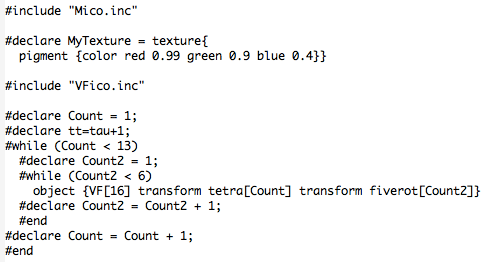
POV2

The nested while loops produce the 60 yellow faces of the polyhedron.  Because of the high icosahedral symmetry of the polyhedron, once you specify one yellow face, you can use matrices to move that face around and get the 59 others.

To get the 60 matrices, you can take each of 12 matrices representing the symmetries of a tetrahedron (tetra[Count]), and multiply each by the five matrices representing the rotations around the vertices of an icosahedron (fiverot[Count2]).  There is a lot of linear algebra going on here; the matrices are defined in the file “Mico.inc”, which is included.

The vertices of the yellow faces are given in “VF[16]”, where the “VF” stands for “vertex figure.”  These vertex figures are imported from the file “VFico.inc”.  Lots of geometry going on here, but what’s important is this:  the polygon with vertices listed in VF[16] is successively transformed by two symmetry matrices, and then the result is defined to be an “object” in our scene.  So the nested loops place 60 objects (yellow triangles) in the scene.  The red pentagrams are created similarly.

POV3

Finally, the glass tabletop!  I wanted the effect to be subtle, and found that the built-in texture “T_Glass2” did the trick — I created a square (note the first and last vertices are the same; a quirk of POV-Ray) of glass for the polyhedron to sit on.

POV-Ray does the rest!  The overall idea is this:  put whatever objects you want in a scene.  Then set up your camera, adjust the lighting, and let POV-Ray render the resulting image.

petrie10

Of course this introduction is necessarily brief — I just wanted to give you the flavor of coding with POV-Ray.  There are lots of examples online and within the documentation, so it should not be too difficult to get started if you want to experiment yourself!

Polygons

In working on a proposal for a book about three-dimensional polyhedra last week, I needed to write a brief section on polygons.  I found that there were so many different types of polygons with such interesting properties, I thought it worthwhile to spend a day talking about them.  If you’ve never thought a lot about polygons before, you might be surprised how much there is to say about them….

So start by imagining a polygon — make it a pentagon, to be specific.  Try to imagine as many different types of pentagons as you can.

How many did you come up with?  I stopped counting when I reached 20….

Likely one of the first to come to mind was the regular pentagon — five equal sides at angles of 108° from each other.  Question:  did you only think of the vertices and edges, or did you include the interior as well?

Day106Penta3

Why consider this question?  An important geometrical concept is that of convexity.  A convex polygon property has the property that a line segment joining any two points in the polygon lies entirely within the polygon.

Day106Convexity

The two polygons on the left are convex, while the two on the right are not.  But note that for this definition to make any sense at all, a polygon must include all of its interior points.

Convex polygons have various properties.  For example, if you take the vertices of a convex polygon and imagine stretching a rubber band beyond the vertices and letting it snap back, the rubber band will describe the edges of the polygon.  See this Wikipedia article on convex polygons for more properties of convex polygons.

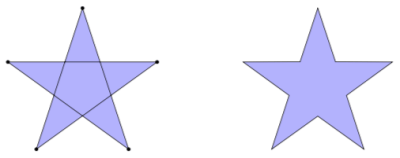
Did the edges of any of your pentagons cross each other, like the one on the left below?

Day106Penta4

In this picture, we indicate vertices with dots to illustrate that this is in fact a pentagon.  The points where the edges cross are not considered vertices of the polygon.  The polygon on the right is actually a nonconvex decagon, even though it bears a resemblance to the pentagon on the left.

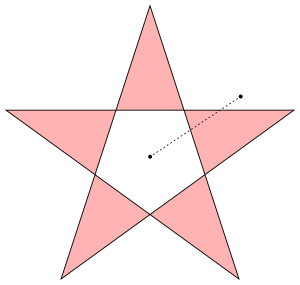
But not so fast!  If you ask Mathematica to draw the polygon on the left with the five vertices in the order they are traversed when drawing the edges, here is what you get:

Day106Penta1.png

So what’s going on here?  Why is the pentagon empty in the middle?  When I gave the same instructions using Tikz in LaTeX (which is how I created the light blue pentagram shown above), the middle pentagon was filled in.

Some computer graphics programs use the even-odd rule when drawing self-intersecting polygons.  This may be thought of in a few ways.  First, if you imagine drawing a segment from a point in the interior pentagon to a point outside, you have to cross two edges of the pentagon, as shown above.  If you draw a segment from a point in one of the light red regions to a point outside, you only need to cross one edge.  Points which require crossing an even number of edges are not considered as being interior to the polygon.

Said another way, if you imagine drawing the pentagram, you will notice that you are actually going around the interior pentagon twice.  Any region traversed twice (or an even number of times) is not considered interior to the polygon.

Why would you want to color a polygon in this way?  There are mathematical reasons, but if you watch this video by Vi Hart all the way through, you’ll see some compelling visual evidence why you might want to do this.

We call polygons whose edges intersect each other self-intersecting or crossed polygons.  And as you’ve seen, including the interiors can be done in one of two different ways.

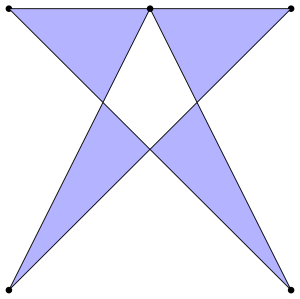
But wait!  What about this polygon?  Can you really have a polygon where a vertex actually lies on one of the edges?

Day106Penta2.png

Again, it all depends on the context.  I think you’re beginning to see that the question “What is a pentagon?” is actually a subtle question.  There are many features a pentagon might have which you likely would not have encountered in a typical high school geometry course, but which still merit some thought.

Up to now, we’ve just considered a polygon as a two-dimensional geometrical object.  What changes when you jump up to three dimensions?

Again, it all depends on your definition.  You might insist that a polygon must lie in a plane, but….

It is possible to specify a polygon by a list of points in three dimensions — just connect the points one by one, and you’ve got a polygon!  Of course with this definition, many things are possible — maybe you can repeat points, and maybe the points do not all lie in the same plane.

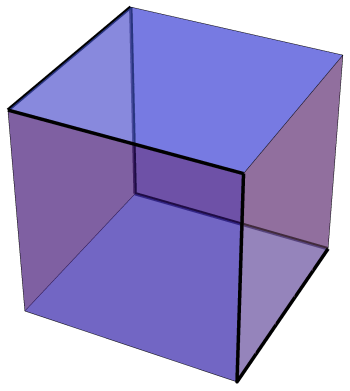
An interesting example of such a polygon is shown below, outlined in black.

Day106Cube

It is called a Petrie polygon after the mathematician who first described it.  In this case, it is a hexagon — think of holding a cube by two opposite corners, and form a hexagon by the six edges which your fingers are not touching.

There is a Petrie polygon for every Platonic solid, and may be defined as follows:  it is a closed path of connected edges such that no three consecutive edges belong to the same face.  If you look at the figure above, you’ll find this is an alternative way to define a Petrie hexagon on a cube.

And if that isn’t enough, it is possible to define a polygon with an infinite number of sides!  Just imagine the following jagged segment continuing infinitely in both directions.

Day106Apeirogon

This is called an apeirogon, and may be used to study the tiling of the plane by squares, four meeting at each vertex of the tiling.

And we haven’t even begun to look at polygons in other geometries — spherical geometry, projective geometry, inversive geometry….

Suffice it to say that the world of polygons is much more than just doodling a few triangles, squares or pentagons.  It is always amazes me how such a simple idea — polygon — can be the source of such seemingly endless investigation!  And serve as another illustration of the seemingly infinite diversity within the universe of Geometry….

Bridges 2017 in Waterloo, Canada!

Bridges 2017 was in full swing last weekend, so now it’s time to share some of the highlights of the conference.  Seems like they keep getting better each year!

The artwork was, as usual, quite spectacular.  I’ll share a few favorites here, but you can go to the Bridges 2017 Gallery to see all the pieces in the exhibitions, along with descriptions by the artists.

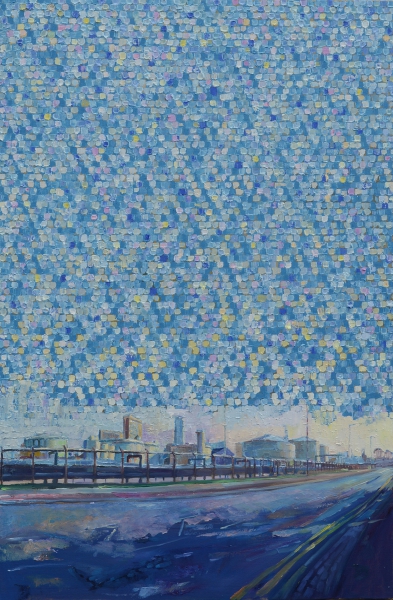
My favorite painting was Prime numbers and cylinders by Stephen Campbell.

campbell

What is even more amazing than the piece itself is that Stephen makes his own paint!  So each piece involves an incredible amount of work – and the results are worth it.  Visit Stephen’s website to see more of his work and learn a bit more about his artistic process.

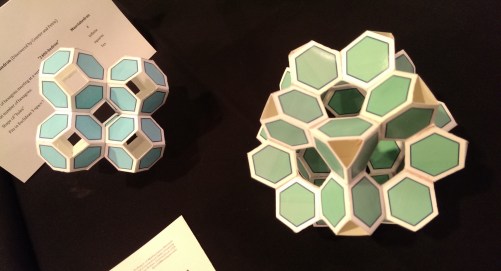
I also liked these open tilings of space by Frank Gould.

IMAG6969

Although they are simple in design, the overall effect is quite appealing.  I often find that the fewer elements in a piece, the more difficult it is to coax them into interacting in a meaningful way.  It is challenging to be a minimalist.

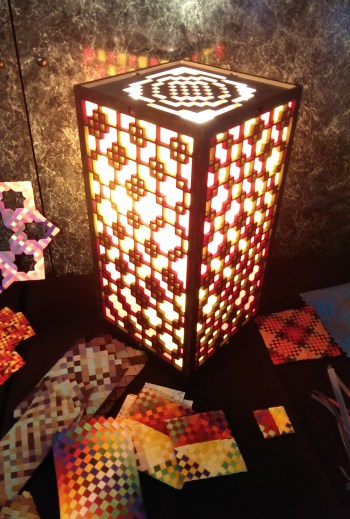
This lantern, Variations on Colourwave 17 — Mod 2, designed by Eva Knoll, shows a pattern created using modular arithmetic.

IMAG6988

The plenary talks this year were almost certainly the best I have ever experienced at any conference.  Opening the conference was a talk by Damian Kulash of the band OK Go.  He described his creative process and gave some insight to how he makes his unbelievable videos.

OKGo.png

They really cannot be described in words – one example he talked about was this video filmed in zero gravity in an airplane!  There are no tricks here — just unbridled creativity and cleverness.

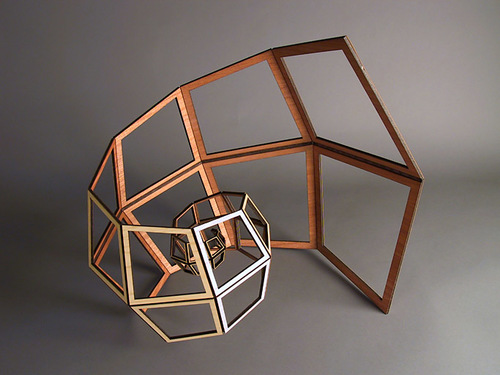
Another favorite was the talk by John Edmark.  Many of his ideas had a spiral theme, like the piece you see below.

edmark

But what is fascinating about his work is how it moves.  When this structure is folded inward, it actually stretches out.  This is difficult to describe in words, but you can see a video of this phenomenon on John’s website.  What made his talk really interesting is that he discussed the mathematics behind the design of his work.

Stephen Orlando talked about his motion exposure photography.

orlando2

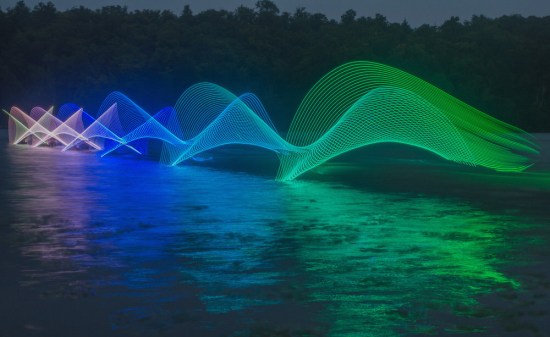
Although seemingly impossible, this image is just one long-exposure photograph — the colors you see were not added later.  Stephen’s technique is to put programmable LED lights on a paddle and photograph a kayaker paddling across the water.

But where is the kayaker?  Notice the background — it’s almost dark.  It turns out that if the kayaker moves at a fast enough rate, the darkness does not allow enough time for an image of the kayaker to be captured.  Simply amazing.  Visit Stephen’s website for more examples of his motion exposure photographs.

There were also many other interesting talks given by Bridges participants, but there is not enough room to talk about them all.  You can always go to the Bridges 2017 website and download any of the papers you’re interested in reading.

But Bridges is also more than just art and talks.  Bridges participants are truly a community of like-minded people, so social and cultural events are also an important aspect of any Bridges conference.

I shared an AirBnB with Nick and his parents a short walk from campus — the house was spacious and comfortable, and really enhanced the Bridges experience.  Sandy (Nick’s mother) wanted to host a gathering, so I invited several friends and colleagues over the Friday night of the conference for an informal get-together.

It was truly an inspiring evening!  There were about fifteen of us, mostly from around the Bay area.  Everyone was talking about mathematics and art — we were so engrossed, it turns out that no one even remembered to take any pictures!  One recurring topic of discussion was the possibility of having some informal gatherings throughout the year where we could share our current thoughts and ideas.  I think it may be possible to use space at the University of San Francisco — I’ve already begun looking into it.

Lunch each day was always from 12:00–2:00, so there was never any need to rush back.  This left plenty of time for conversation, and often allowed time to admire the art exhibitions.  It seems that you always noticed something new every time you walked through the displays.

On Saturday evening of the conference was a choir concert featuring a cappella voices singing a wide range of pieces spanning from the 15th century to the present day.  It was a very enjoyable performance; you can read more about it here.

The evening of Sunday, July 30th, was the last evening of the conference for us.  Many participants were going to Niagara Falls the next day, but we were all flying out on Monday.  We decided to find a group and go out for dinner — and about a dozen of us ended up at a wonderful place for pizza called Famoso.

We chatted for quite some time, and then split up — some wanted to attend an informal music night/talent show on campus, but others (including me and the Mendlers) went to shoot some pool at a local pool hall.  Again, a good time was had by all.

While the first day of the conference seemed a little slow, the rest just flew by.  Another successful Bridges conference!  Nick and I both had artwork exhibited and gave talks, caught up with friends and colleagues from all around the globe, enjoyed many good meals, and got our fill of mathematical art.

Although the location for the next Bridges conference is usually announced at the end of the last plenary talk, these is still some uncertainty about who will be hosting the conference next year.  But regardless of where it is, you can expect that Nick and I will certainly be there!

Still more on: What is…Inversive Geometry?

Now for the final post on inversive geometry!  I’ve been generating some fascinating images, and I’d like to share a bit about how I make them.

2017-07-19Inversion3v2.png

In order to create such images in Mathematica, you need to go beyond the geometrical definition of inversion and use coordinate geometry.  Let’s take a moment to see how to do this.

Recall that P′, the inverse point of P, is that point on a ray drawn from the origin through P such that

[OP]\cdot[OP']=1,

where [AB] denotes the distance from A to B.  Feel free to reread the previous two posts on inversive geometry for a refresher (here are links to the first post and the second post).

Now suppose that the point P has Cartesian coordinates (x,y).  Points on a ray drawn from the origin through P will then have coordinates (kx, ky), where k>0.  Thus, we just need to find the right k so that the point P'=(kx,ky) satisfies the definition of an inverse point.
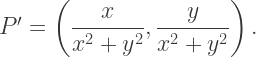
This is just a matter of a little algebra; the result is

P'=\left(\dfrac{x}{x^2+y^2},\dfrac{y}{x^2+y^2}\right).

What this means is that if you have an equation of a curve in terms of x and y, if you substitute x/(x^2+y^2) everywhere you see x, and substitute y/(x^2+y^2) everywhere you see y, you’ll get an equation for the inverse curve.

Let’s illustrate with a simple example — in general, the computer will be doing all the work, so we won’t need to actually do the algebra in practice.  We’ll look at the line x=1.  From our previous work, we know that the inverse curve must be a circle going through the origin.
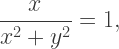
Making the substitution just discussed, we get the equation

\dfrac x{x^2+y^2}=1,

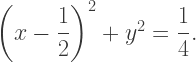
which may be written (after completing the square) in the form

\left(x-\dfrac12\right)^2+y^2=\dfrac14.

It is not hard to see that this is in fact a circle which passes through the point (0,0).

Now we need to add one more step.  In the definition of an inverse point, we had the point O being the origin with coordinates (0,0).  What if O were some other point, say with coordinates (a,b)?

Let’s proceed incrementally.  Beginning with a point (x,y), translate to the point (x-a,y-b) so that the point (a,b) now acts like the origin.  Now use the previous formula to invert:

\left(\dfrac{x-a}{(x-a)^2+(y-b)^2},\dfrac{y-b}{(x-a)^2+(y-b)^2}\right).

Finally, translate back:

\left(a+\dfrac{x-a}{(x-a)^2+(y-b)^2},b+\dfrac{y-b}{(x-a)^2+(y-b)^2}\right).

This is now the inverse of the point (x,y) about the point (a,b).

So what you see in the above image is several copies of the parabola y=x^2 inverted about a series of equally spaced points along the line segment with endpoints (1/2,-1/2) and (3/2,1/2).  This might seem a little arbitrary, but it takes quite a bit of experimentation to find a set of points to invert about in order to create an aesthetically pleasing image.
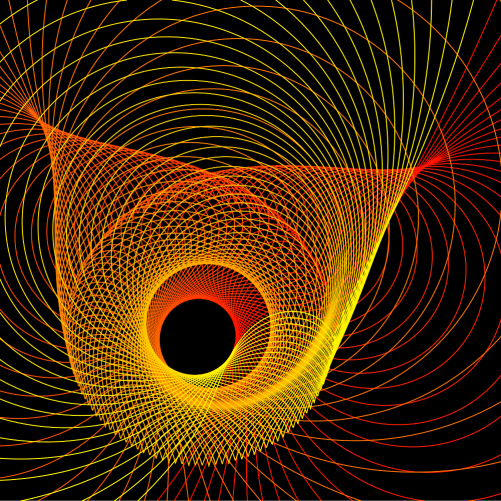
Of course there is another perspective on accomplishing the same task — just shift the parabolas first, invert about the origin, and then shift back.  This is geometrically equivalent (and the algebra is the same); it just depends on how you want to look at it.

Here is another image creating by inverting the parabola y=x^2 about points which lie on a circle.

2017-07-18Inversion1v2

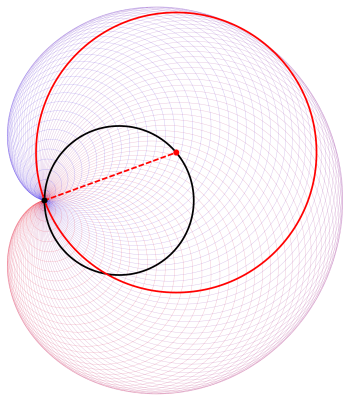
And while we’re on the subject of inverting parabolas, let’s take a moment to discuss the cardioid example we looked at in our last conversation about inversion:

Cardioid2

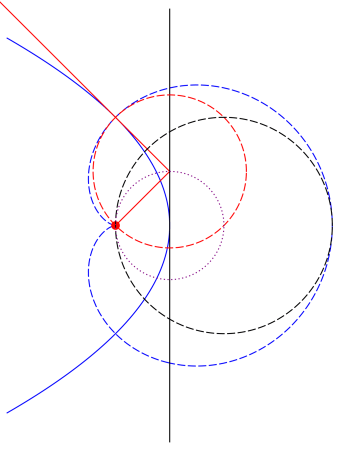
To prove that this construction of circles actually yields a cardioid, the trick is to take the inverse of a parabola about its focus.  If you do this, the tangent lines of the parabola will then invert to circles tangent to a cardioid.  I won’t go into all the details here, but I’ll outline how the proof goes using the following diagram.

Day104ParabolaProperty

Draw a line (shown in black) tangent to the blue parabola at its vertex; the inverse curves are shown in the same color, but dashed.  Note that the black circle must be tangent to the blue cardioid since the inverse black line is tangent to the inverse parabola.

The small red disk is the focus of the parabola.  Key to the proof is the property of the parabola that if you draw a line from the focus to a point on the black line and then bounce off at a right angle (the red lines), the resulting line is tangent to the parabola.  So the inverse of this line — the red dashed circle — must be tangent to the cardioid.

Since perpendicularity is preserved and the line from the focus inverts to itself (since we’re inverting about the focus), the red circle must be perpendicular to this line — meaning that the line from the focus in fact contains a diameter, and hence the center, of the red circle.  Then using properties of circles, you can show that all centers of circles formed in this way lie on a circle (shown dotted in purple) which is half the size of the black circle.  I’ll leave the details to you….

Finally, I’d like to show a few examples of using the other conic sections.  Here is an image with 80 inversions of an ellipse around centers which lie on a line segment.

2017-07-22Inversion1v2

And here is an example of 100 hyperbolas inverted around centers which lie on a line segment.  Since the tails of the branches of a hyperbola all go to infinity, they all meet at the same point when inverted.

2017-07-22Inversion2v2

So now you know how to work with geometrical inversion from an algebraic standpoint.  I hope seeing some of the fascinating images you can create will inspire you to try creating some yourself!

Imagifractalous! 7: Fractal Binary Trees IV

Bridges 2017 is next week in Waterloo, Ontario, Canada!  We’re all looking forward to it…Nick and his parents are also going, and I’ll get to see a lot of new friends I met last year in Finland.

In preparation, I’ve been creating a portfolio of binary and ternary trees.  I’ve been coloring and highlighting the branches to make them easier to understand, so I thought I’d take the opportunity to share several of them.  Mathematics just as it’s happening….

Here is an example of what I’m talking about.

2017-07-20-0is11v1

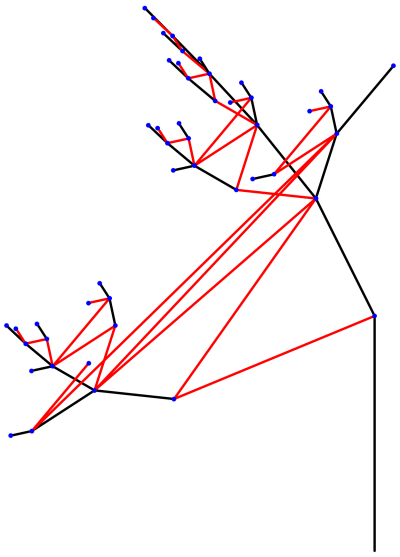
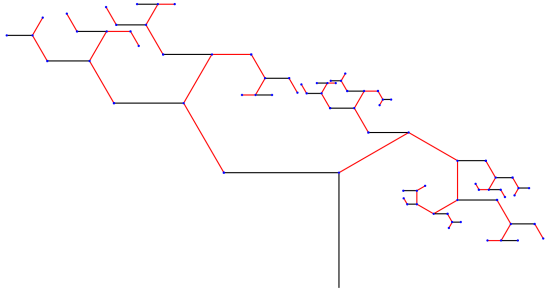
Recall that we’re generalizing the idea of “left” and “right” branches of a binary tree — rather that just rotating left or right (and possibly scaling), we’re allowing any affine transformation to correspond to “left” and “right.”  In order to avoid any confusion, let’s refer to the transformations as “0” and “1.”

In the tree above, the 0 branches are shown in black, and the 1 branches in red.  Notice that sometimes, the 0 branches seem to go to the right, other times, to the left.  This is a common occurrence when you allow the branching to be determined by more general transformations.

Here, you’ll notice that 0 and 11 take you to the same place — beginning with the trunk (the vertical black line at the right), if you follow one black branch, you’ll end up at the same blue node as you would if you followed two red branches.  In fact, no matter what blue node you start at, following one black branch will always take you to the same place as following two red branches.

Here is not the place to go into too many details, but let me give you the gist of what we’re studying.  If you denote the transformation which generates the black branches by B_0 and that which generate the red branches by B_1, you will observe behavior like that in the above tree if

B_0=B_1+B_1^2.

Right now, most of the work I’m doing revolves around saying that I want to generate a tree with a certain property (like 0 and 11 going to the same node), and then solving the corresponding matrix equation to find interesting examples of trees with this property.  Usually the linear algebra involved is fairly complicated — feel free to comment if you’d like to know more.  As I said, this blog is not the place for all the details….

Below is another interesting example.

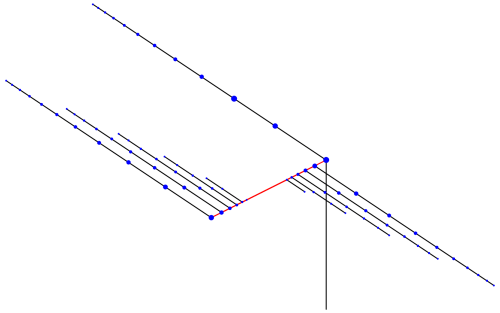
2017-07-20-0is00v2.png

In this tree, 0 and 00 go to the same node.  What this means in terms of branching is that there can never be two consecutive black branches (again, 0 is black and 1 is red) — taking the additional 0 branch leaves you in exactly the same place.

Note that for this property to hold, there is no restriction on what the 1 transformation can be.  Above, the transformation B_1 is a scaled rotation by 60°.  This is what produces the spirals of red branches emanating from the nodes of the tree.
2017-07-20-0is01v1.png

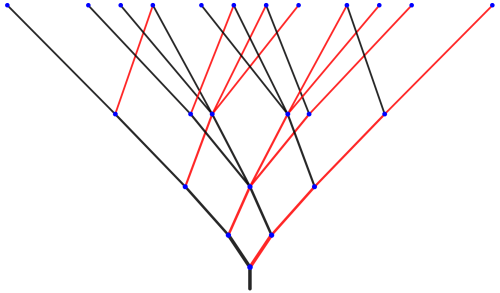
In this example, 0 and 01 go to the same node (0 is black, 1 is red).  Implications for the tree are that the red branches zigzag back and forth, getting shorter with each iteration.  Moreover, there aren’t any red branches drawn after a black branch (except the first time, off the end of the trunk of the tree).  This is because 01 — taking a red branch after a black branch — takes you to the same place as 0, which is taking a black branch.  In other words, the red branch doesn’t take you any further.

2017-06-27-01is10.png

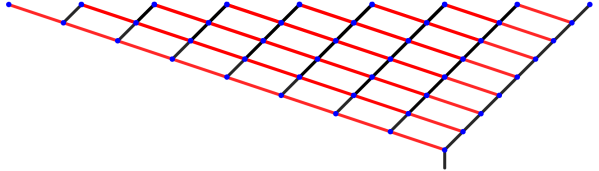
Here, 01 and 10 take you to the same node (again, 0 is black and 1 is red).  This is easy to see — there are many quadrilaterals in the tree formed by alternating red and black branches.  In addition, the iterations of this tree move progressively higher each time — so, for example, all the nodes at the top are at a depth of 4.

If you look at the number of new nodes at each level, you get a sequence which begins

2, 3, 6, 12, 24, 48, 96, 192, 384, 768, ….

After the second level, it seems that the number of new nodes doubles with each iteration.  I say “seems” since it is generally very difficult to prove that such a relationship continues up arbitrarily many levels.  Although it is easy to find the sequence of numbers of nodes for any tree using Mathematica, I have rigorous proofs of correctness for only three cases so far.

What makes the proofs so difficult?  The following tree is another example of a case where 01 and 10 go to the same node.

2017-06-25-01is10v1

But the sequence of new nodes at each level is just 2, 3, 4, 5, 6, ….  (This is one case I’ve rigorously proved.)  The transformations B_0 and B_1 used to make this tree, in addition to forcing 01 and 10 to go to the same node, also have additional properties which force any two strings of the same length with the same number of 0’s (and therefore the same number of 1’s as well) to go to the same node.  So to prove the sequence of nodes in the previous case is 2, 3, 6, 12, 24, 48, …, you need to say which strings take you to the same nodes, and prove that this pattern continues no matter how far you go up — and that there are no “surprise” coincidences of other nodes as you proceed.

It is also possible to look at infinite strings going to the same node, as shown below.  The linear algebra gets quite a bit more involved in these cases.

2017-07-02infp1q1.png

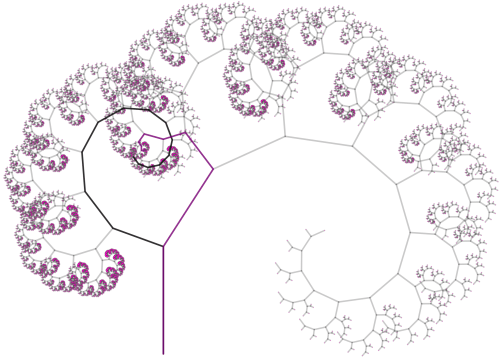
Here, 0 and 1 do in fact correspond to going left and right, respectively.  The thicker black path corresponds to the string 011111…, that is, going left once, and then going to the right infinitely often, creating the spiral you see above.  The thicker green path corresponds to alternating 10101010… infinitely often, creating a zigzag path which approaches exactly the same point as the black spiral does.

Here is another example, where the spiral 011111… (in black) approaches the same point as the infinite zigzag 100100100100… (in purple).

2017-07-02infp1q2.png

These are some of my favorite examples.  But I should remark that once you know how to mathematically find transformations which produce trees with a desired property, it takes a lot of fiddling around to find aesthetically pleasing examples.

I hope these examples give you a better idea of the nature of our research.  I’ll update you on Bridges when I get back, and let you know about any interesting comments other participants make about our trees.  I leave on Wednesday, and will post pictures daily on my Twitter @cre8math if you’d like a daily dose of mathematical art!

More on: What is…Projective Geometry?

This week, I thought I’d go a little deeper into the subject of projective geometry (feel free to reread last week’s post for a refresher).  Why? I think this is a good opportunity to discuss the idea of an algebraic model of a geometry.  Certainly using Cartesian coordinates in the Euclidean plane makes many geometrical problems easier to approach.

So what would a coordinate system in projective geometry look like?  The most commonly used system is homogeneous coordinates.  Let’s see how they work.

The difficulty with adding the line at infinity is that we need infinitely many points in addition to those already in the plane.  Perhaps you might imagine that adding an “infinite” coordinate might do the trick, but there is an alternative — and algebraically simpler — approach.

First, think of the Euclidean plane as being the plane z = 1 in three-dimensional Cartesian coordinates, so that every Euclidean point (xy) is given homogeneous coordinates (xy, 1).  But we don’t want to make the z-coordinate special — we want all the homogeneous coordinates to have similar interpretations.  We accomplish this by giving each point infinitely many names — specifically, for any k ≠ 0, the coordinates (kxkyk) describe the same point as (xy, 1).  Geometrically, you might think of this as saying that the line through  (xy, 1) (except the origin) is, in some sense, the point (xy, 1).

So if z ≠ 0, the point (xyz) in homogeneous coordinates is another name for the Euclidean point (x/zy/z).  But why would you want to do this?

The punch line is that we can now use z = 0 to indicate that a point is on the line at infinity!  We still keep the convention that if k ≠ 0, the homogeneous coordinates (kxky, 0) describe the same point as (xy, 0), as long as x and y are not both 0.

So our system of homogenous coordinates contains all points (xyz) such that not all three coordinates are 0.  Any point with z ≠ 0 corresponds to a Euclidean point, and any point with z = 0 corresponds to a point on the line at infinity.

Is it really worth all this trouble?  There are many interesting features of such a coordinate system — and I’d like to mention a few of them here, omitting the proofs.  There are many resources online that include all the details — one example is the classic Projective Geometry by Veblen and Young available free as an ebook.

Let’s start be looking at equations of lines in projective geometry.  In the Cartesian plane, we may represent a line in the form Ax + By + C = 0, where A, B, and C are not all zero.  In the projective plane, a line has the form form Ax + By + Cz = 0, where A, B, and C are not all zero.  Nice, isn’t it?  This form is also consistent with our system of having many names for a point:  if Ax + By + Cz = 0 and k ≠ 0, then also A(kx) + B(ky) + C(kz) = 0 as well. So no problems there.

But the really neat aspect of this representation is how you can use linear algebra in three dimensions to solve many problems in projective geometry.  This isn’t a post about linear algebra — so I’ll limit myself to just one example.  But in case you do know something about linear algebra, I think you should see how it can be used in projective geometry when homogeneous coordinate are used.

We’ll consider the problem of finding the intersection of two lines, say Ax + By + Cz = 0 and Dx + Ey + Fz = 0.  The form of these expressions should remind you of taking the dot product, so that we can rewrite these expressions as

(A,B,C)\cdot(x,y,z)=(D,E,F)\cdot(x,y,z)=0.

Interpreting these coordinates and coefficients as vectors in three-dimensional space, we observe that the common point (xyz) is simultaneously perpendicular to both (A, B, C) and (D, E, F), since both dot products are zero.  So (xyz) can be found using the cross-product

(x,y,z)=(A,B,C)\times(D,E,F).

Very nice!  Again, there are many such examples, but this is not the place to discuss them….

This algebraic model also suggests another geometric model for the projective plane besides adding a line at infinity to the Euclidean plane.  Begin with the surface of a sphere centered at the origin in three-dimensional Cartesian space, and observe that opposite points on the sphere have homogeneous coordinates that are different names for the same point in the projective plane.

So, in some sense, we have exactly twice as many points as we need — so we identify opposite points on this sphere, so that they are in fact the same point.  (You might recall a similar discussion about points in the post on spherical geometry.)  Thinking about it in another way, we might just consider the top hemisphere of the sphere with only half of the equator, including just one of the endpoints of the semicircle.

And while this model is fairly simple geometrically, it is important to point out that this does not mean that the projective plane lies inside three-dimensional space.  Once we have our hemisphere and semicircle, we have to think about it without any of the surrounding space.  This is not easy to do, but this type of thinking is necessary all the time when studying differential geometry, a topic for another time….

One last benefit to using homogenous coordinates:  it can easily be abstracted to any number of dimensions.  Do you want a projective space?  Just add a plane at infinity to three-dimensional Euclidean space!  Coordinates are easy — all points (x, y, z, w), with not all coordinates equal to 0.  When w ≠ 0, the point (x, y, z, w) corresponds to the Euclidean point (x/w, y/w, z/w), and when w = 0, the point is on the plane at infinity.

And clearly, there would be no need to stop at three dimensions — it is just as easy to create a projective space of four or more dimensions.

Finding a workable system of coordinates for a particular geometry is not always a simple matter — but finding a system that allows problems to be solved easily is often a key step to studying any type of geometry.  I hope this gives you some insight to yet another aspect of the diverse universe of so many different Geometries….

What is…Projective Geometry?

The last type of geometry I discussed was inversive geometry, which is obtained by adding a point at infinity to the Euclidean plane.  Recall that as long as we had a consistent, useful model of this extended plane, it made perfect sense to define this new type of geometry.

Today, we’re going to add a line at infinity — creating what is called a projective geometry.  There are in fact many different types of projective geometries, but let’s just try to understand one at a time….

You might remember one important property of ω, the point at infinity in inversive geometry:  it was on every unbounded curve, and in particular, on every line. We need to be a bit more specific with our projective geometry, in the following sense.  Every line will intersect the line at infinity — denoted by λ — but not every line will intersect at the same point.

Consider all lines with some given slope m.  We then add one point to λ which lies on these lines, but no other lines.  In other words, each point on λ corresponds to an infinite family of parallel Euclidean lines — since now, with the addition of λ, there are no parallel lines in the projective plane.  The point at which two parallel (in the Euclidean sense) lines intersect is determined by their slope.

How does this differ from inversive geometry?  Well, in inversive geometry, if two lines had different slopes, they intersected in two points:  the usual finite point of intersection you learned about in algebra class, as well as ω.  But in projective geometry, two lines with different slopes intersect in only one point, since they intersect the line at infinity in two different points.

What this means is that any two distinct lines always intersect in exactly one point.  See the difference?  Parallel lines (in the Euclidean sense) intersect in a point on λ, and nonparallel (in the Euclidean sense) lines intersect in the same point they did in Euclidean geometry.

Now let’s look at the dual question (recall the discussion of duality, an important concept in spherical geometry):  what about a line between two points?  Two finite points generate a line, as usual.  If one point is finite and one lies on λ, the line generated is that line through the finite point with the slope corresponding to the point on λ.  And if both points are infinite, then the line through them is just λ.

Thus we have the following duality:  two distinct lines determine a unique point, and two distinct points determine a unique line.  Again, duality is an extremely powerful concept in geometry, so the fact that points and lines are dual concepts really is a legitimate justification for thinking about projective geometry.

Projective plane geometry is a broad subject — but some of my favorite objects to look at in projective geometry are the conic sections:  ellipses, parabolas, and hyperbolas.  This is because from the point of view of projective geometry, they are, in a sense which we’ll look at right now, all the same.

This sounds odd at first reading, but follow along.  The first question we need to consider is what points on λ lie on unbounded curves.  For lines, it’s easy — it’s just the point on λ corresponding to the slope of the line.

Now what about a parabola?parabola

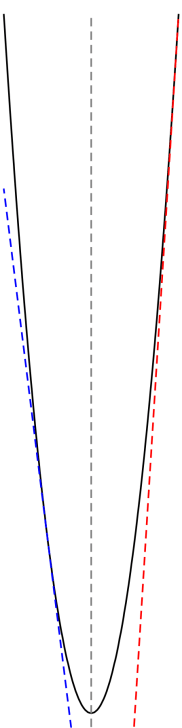
You can see from the image that as points on the parabola move further away from its vertex, the tangents have slopes of ever-increasing magnitude.  Determining the precise slopes is an easy exercise in calculus — but what is important is that the tangent lines approach, in slope, the axis of the parabola.  In this case the axis is vertical, but of course the parabola may be rotated.

What this means is that the parabola intersects the line at infinity in the point corresponding to the slope of its axis.  Again, the tangent lines on either side approach this slope, but from two directions — from above and from below.

Now hold this thought while we look at a hyperbola.

hyperbola

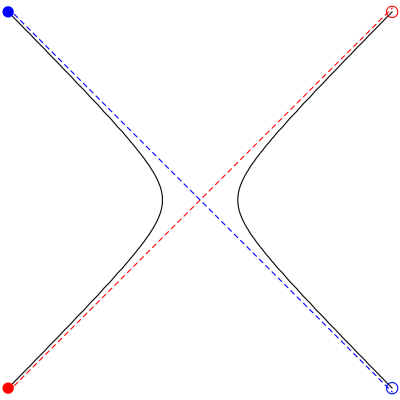
Let’s see how we travel along the hyperbola.  As we move to the upper right toward the open red circle, we are moving closer to the red dashed asymptote — meaning we approach the point on λ corresponding to the slope of the red asymptote.  But here is where it becomes interesting:  as we cross the line at infinity, we come back along the asymptote toward the filled red circle on the other branch of the hyperbola!

Then we continue moving along the left branch, getting continually closer to the blue asymptote, approaching that point on λ corresponding to the slope of the blue asymptote as we pass through the blue filled circle.  Then we cross the line at infinity again, and jump to the right branch of the hyperbola toward the open blue circle.

Can you see what this means?  In projective geometry, a hyperbola does not have two separate branches.  Adding the line at infinity allows us a means to jump between the two branches.

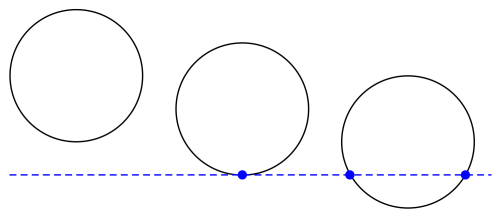
Let’s look at these scenarios from a slightly different perspective.  Suppose that somehow, we can actually draw the line at infinity.  It’s the blue dashed line in the figure below.  Easy.

conics

Can you see where we’re going with this?  The left circle represents an ellipse, since it is a bounded curve and cannot intersect λ.  The middle circle represents a parabola — it’s a curve which intersects the line at infinity at exactly one point, and so is actually tangent to λ.  The right circle represents a hyperbola, since it intersects the line at infinity at two points.  It may look strange from this perspective, but this right circle really does represent the hyperbola illustrated above.

To summarize:  if a conic does not intersect the line at infinity, we call it a Euclidean ellipse, if it is tangent to λ, we call it a Euclidean parabola, and if it intersects λ in two points, we call it a Euclidean hyperbola.

Because you see, in projective geometry, there is no distinguished line.  Every line is just like any other.  So, in some sense, these is just one conic section in projective geometry!

What we have looked at today is what would be called an embedding of the Euclidean plane in the projective plane.  We saw how we could just add a line at infinity with certain properties, and our plane would behave “projectively.”  But from the perspective of projective geometry, you’ve just got conic sections and lines, with possibly 0, 1, or 2 intersection points as illustrated above.  A little mind-blowing, but absolutely true.

Of course we’ve only been able to scratch the surface of this really amazing geometrical world today.  Hopefully you will be inspired to learn a little bit more about it….

100 Posts!

Can you believe it?  I have been waiting to be able to finally tag “Day1xx”, and that day is finally here!

I could say something momentous on this occasion.  But I’m not sure that’s really necessary — you can imagine that keeping a blog running for 100 weeks with (hopefully!) interesting posts on mathematics, creativity, and art is momentous emough.

But I have been running into a problem:  my blog is getting harder to search.  For example, I just got five pages of results by searching for “fractal”!  So I thought I’d put together an index of all my blog posts, organized by category.

I hope this is of use to newer followers — you might like certain topics better than others, and this way you can easily look at older posts related to the ones you like.

The category a post is listed under is what I consider its primary category — but rarely does a single post only address on topic.  But surely this index is a step in the right direction.

And lastly, I would like to thank all my followers for encouraging to keep me going.  I get an email every time someone likes or comments — and I appreciate each one. Thanks again!

A.  Introduction

  1. Day001, What Is Mathematics?

B.  Mathematical and Digital Art

  1. Day002, Josef Albers and Interaction of Color.
  2. Day011, Evaporation I.
  3. Day012, Evaporation II.
  4. Day015, Geometrical Dissections II: Four to One.
  5. Day022, Envelopes III:  Art and Randomness
  6. Day029, The Joy of Ink I.
  7. Day030, The Joy of Ink II.
  8. Day054, Color I: Opacity and Josef Albers.
  9. Day055, Color II: Opacity and Josef Albers.

C.  Mathematical Puzzles

  1. Day003, CrossNumber Puzzles.
  2. Day005, Cryptarithms.
  3. Day010, ColorSlide Puzzles.
  4. Day018, Roman Numeral Puzzles.
  5. Day024, Logic Puzzles I.
  6. Day025, Logic Puzzles II.
  7. Day031, Number Searches I.
  8. Day032, Number Searches II.
  9. Day109, Beguiling Games I:  Nic-Nac-No.
  10. Day114, Beguiling Games II:  Nuh-Uh!
  11. Day119, Beguiling Games III:  Splotch!
  12. Day122, Knights and Rogues.
  13. Day125, Beguiling Games IV:  Scruffle.
  14. Day132, More CrossNumber Puzzles.

D.  Two-Dimensional Geometry

  1. Day004, Hexominoes and Cube Nets.
  2. Day014, Geometrical Dissections I.
  3. Day020, Envelopes I.
  4. Day021, Envelopes II:  Making Spirals.
  5. Day074, The Ravioli Equation.
  6. Day106, Polygons.
  7. Day118, Geometrical Dissections III:  Octagons and Dodecagons.

E.  Pedagogy

  1. Day006, Day163 (reprise), The Problem with Calculus Textbooks.
  2. Day013, Writing Original Problems.
  3. Day023Day093 (reprise), The Problem with Grades.
  4. Day026, On Grading.
  5. Day028, International Dodecahedron Day 2016!
  6. Day158, Teaching Three-Dimensional Geometry, I.
  7. Day160, Teaching Three-Dimensional Geometry, II.
  8. Day161, Teaching Three-Dimensional Geometry, III.
  9. Day164, On Assessment, I.
  10. Day165, On Assessment, II.
  11. Day166, On Assessment, III.
  12. Day167, On Assessment, IV.
  13. Day168, On Assessment, V.

F.  Koch Curves and Related Topics

  1. Day007, Creating Fractals.
  2. Day008, Creating Fractals II: Recursion vs. Iteration.
  3. Day009, Creating Fractals III: Making Your Own.
  4. Day027, Creating Fractals IV:  Results!
  5. Day033, New Koch Snowflakes.
  6. Day062, Koch Curves and Canopies.
  7. Day065, p-adic Numbers I: When Big is Small.
  8. Day067, p-adic Numbers II: When Big is Small.

G.  Essays

  1. Day016, On Mathematical Creativity I.
  2. Day017, On Mathematical Creativity II.
  3. Day019, Writing a Math Blog.

H.  Iterated Function Systems

  1. Day034, Creating Fractals V:  Iterated Function Systems I.
  2. Day035, Creating Fractals VI:  Iterated Function Systems II.
  3. Day036, Creating Fractals VII:  Iterated Function Systems III.

I.  Programming and Coding

  1. Day037, Creating Fractals VIII:  PostScript Programming.
  2. Day058, On Coding I.
  3. Day060, On Coding II: LISP.
  4. Day064, On Coding III: LISP to Mathematica.
  5. Day068, On Coding IV: Mathematica.
  6. Day075, On Coding V: Postscript.
  7. Day078, On Coding VI: HTML.
  8. Day082, On Coding VII: LaTeX I.
  9. Day085, On Coding VIII: LaTeX II.
  10. Day092, On Coding IX: Computer Graphics I.
  11. Day099, On Coding X: Computer Graphics II.
  12. Day107, On Coding XI: Computer Graphics III, POV-Ray.
  13. Day117, On Coding XII:  Python.
  14. Day121, On Coding XIII:  Retrospective.

J.  Mathematics and Art Conferences

  1. Day038, Bridges:  Mathematics and Art I.
  2. Day049, Bridges:  Mathematics and Art II.
  3. Day050, Vienna!  (Symmetry Conference 2016).
  4. Day053, Bridges: Mathematics and Art III. Jyvaskyla, Finland!
  5. Day083, Art Exhibition: Golden Section 2017.
  6. Day105, Bridges 2017 in Waterloo, Canada!
  7. Day134, Art Exhibition: Golden Section 2018.
  8. Day169, Jagodina, Serbia:  2018.

K.  Processing

  1. Day039, Making Movies with Processing I.
  2. Day040, Making Movies with Processing II.
  3. Day041, Making Movies with Processing III.
  4. Day042, Making Movies with Processing IV.
  5. Day043, Making Movies with Processing V.
  6. Day044, Making Movies with Processing VI.
  7. Day108, To Processing I.
  8. Day110, Using Processing for the First Time.
  9. Day113, Creating Animated GIFs in Processing.

L.  Mathematics and Digital Art Course

  1. Day045, Mathematics and Digital Art I.
  2. Day046, Mathematics and Digital Art II.
  3. Day047, Mathematics and Digital Art III.
  4. Day048, Mathematics and Digital Art IV.
  5. Day057, Digital Art I: End of Week 2 (Fall 2016).
  6. Day059, Digital Art II: End of Week 4 (Fall 2016).
  7. Day061, Digital Art III: End of Week 6 (Fall 2016).
  8. Day063, Digital Art IV: End of Week 8 (Fall 2016).
  9. Day066, Digital Art V: End of Week 11 (Fall 2016).
  10. Day069, Digital Art VI: End of Week 14 (Fall 2016).
  11. Day071, Digital Art VII: Final Projects! (Fall 2016).
  12. Day072, Digital Art VIII: The End (Fall 2016).
  13. Day081, Mathematics and Digital Art: Update 1 (Spring 2017).
  14. Day086, Mathematics and Digital Art: Update 2 (Spring 2017).
  15. Day090, Mathematics and Digital Art: Update 3 (Spring 2017).
  16. Day094, Mathematics and Digital Art: Final Update (Spring 2017).
  17. Day112, Mathematics and Digital Art: Update 1 (Fall 2017).
  18. Day115, Mathematics and Digital Art: Update 2 (Fall 2017).
  19. Day123, Mathematics and Digital Art: Final Update (Fall 2017).

M.  Guest Bloggers

  1. Day051, Guest Blogger:  Geoffrey Owen Miller, I.
  2. Day052, Guest Blogger:  Geoffrey Owen Miller, II.
  3. Day096, Guest Blogger: Percival Q. Plumtwiddle, I.
  4. Day097, Guest Blogger: Percival Q. Plumtwiddle, II.
  5. Day154, Transforming Mathematics Education:  BAMAS, X.
  6. Day155, Guest Blogger:  Scott Kim, II.
  7. Day156, Guest Blogger:  Scott Kim, III.
  8. Day157, Guest Blogger:  Scott Kim, IV.

N.  Milestones

  1. Day056, Celebrating One Year!

O.  Imagifractalous!

  1. Day070, Imagifractalous! 1: How it all began.
  2. Day073, Imagifractalous! 2: p-adic sequences.
  3. Day077, Imagifractalous! 3: Fractal Binary Trees.
  4. Day087, Imagifractalous! 4: Fractal Binary Trees II.
  5. Day088, Imagifractalous! 5: Fractal Binary Trees III.
  6. Day089, Imagifractalous! 6: Imagifractalous!
  7. Day103, Imagifractalous! 7: Fractal Binary Trees IV.

P.  What is a Geometry?

  1. Day076, What is a Geometry?
  2. Day079, What is…Taxicab Geometry?
  3. Day084, What is…Spherical Geometry?
  4. Day091, What is…Inversive Geometry?
  5. Day095, More on: What is…Inversive Geometry?
  6. Day101, What is…Projective Geometry?
  7. Day102, More on:  What is…Projective Geometry?
  8. Day104, Still more on:  What is…Inversive Geometry?
  9. Day152, What is….A Polygon?

Q.  Miscellaneous Mathematics

  1. Day080, A New Cantor Set?
  2. Day098, The One Four Conjecture.
  3. Day147, Pythagorean Triples.
  4. Day153, Circle Geometry.

R.  Bay Area Mathematical Artists

  1. Day111, Bay Area Mathematical Artists, I.
  2. Day116, Bay Area Mathematical Artists, II.
  3. Day120, Bay Area Mathematical Artists, III.
  4. Day124, Bay Area Mathematical Artists, IV.
  5. Day131, Bay Area Mathematical Artists, V.
  6. Day135, Bay Area Mathematical Artists, VI.
  7. Day140, Bay Area Mathematical Artists, VII.
  8. Day144, Bay Area Mathematical Artists, VIII.
  9. Day149, Still Moving On (and BAMAS IX)….
  10. Day154, Transforming Mathematics Education:  BAMAS, X.
  11. Day159, Bay Area Mathematical Artists Seminars, XI.

S.  In Memory of Fr. Magnus J. Wenninger, O.S.B.

  1. Day 126, Fr. Magnus Wenninger, O.S.B, I.
  2. Day 127, Fr. Magnus Wenninger, O.S.B, II.
  3. Day 128, Fr. Magnus Wenninger, O.S.B, III.
  4. Day 129, Fr. Magnus Wenninger, O.S.B, IV.
  5. Day 130, Fr. Magnus Wenninger, O.S.B, V.

T.  The Puzzle Archives.

  1. Day133, The Puzzle Archives, I.
  2. Day136, The Puzzle Archives, II.

U.  Calculus

  1. Day006, The Problem with Calculus Textbooks.
  2. Day137, The Geometry of Polynomials.
  3. Day138, Calculus:  Linear Approximations, I.
  4. Day139, Calculus:  Linear Approximations, II.
  5. Day141, Calculus:  The Geometry of Polynomials, II.
  6. Day142, Calculus:  Hyperbolic Trigonometry, I.
  7. Day143, Calculus:  Hyperbolic Trigonometry, II.
  8. Day145, Calculus:  Hyperbolic Trigonometry, III.
  9. Day146, Calculus:  Hyperbolic Trigonometry, IV.
  10. Day150, Calculus VII:  Approximations.  [Not sure how the numbering got off….]
  11. Day151, Calculus VIII:  Miscellaneous Problems, I.

V.  Truly Miscellaneous….

  1. Day148, Moving Out and Moving On….
  2. Day149, Still Moving On (and BAMAS IX)….

W.  Polyhedra

  1. Day162, Enumerating the Platonic Solids.
  2. Day174, My Polyhedra Textbook, I.
  3. Day175, My Polyhedra Textbook, II.

X.  Four-Dimensional Geometry

  1. Day170, The Fourth Dimension, I.
  2. Day171, The Fourth Dimension, II.
  3. Day172, The Fourth Dimension, III.
  4. Day173, The Fourth Dimension, IV.